The term has a precise meaning in UI design. AI slop is what an AI coding tool produces when it receives a task with no design direction - the statistically average version of every decision it has to make, assembled into something that works but looks like everything else built the same way.
From the uxskill team · 8 min read · MIT-licensed open source
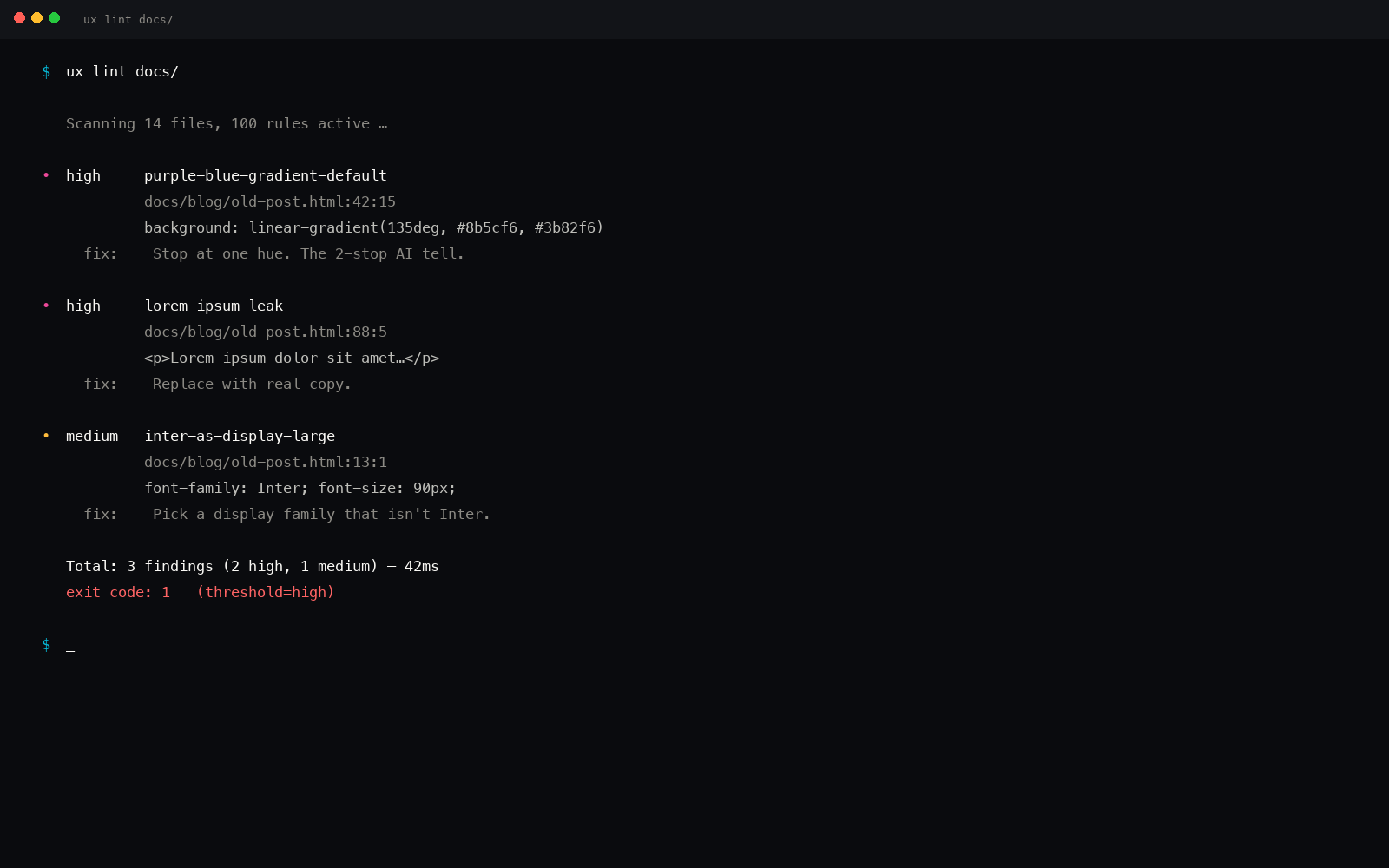
Slop is detectable in source. The linter names each default it finds, where it is, and what to ship instead.
Definition
AI slop is UI generated by a model with no brand or design constraints. The output defaults to the center of its training distribution: a violet-to-indigo gradient as the primary color, three identical feature cards, Inter as the only typeface, emoji in place of icons, and marketing copy that names no specific feature. One of these elements can be coincidence. Four or more on the same page is the centroid look in full.
The term borrows from the agricultural use of "slop" for low-grade, undifferentiated feed. Applied to AI output, it names something structurally different from bad work: slop is technically correct and often visually passable, but it carries no identity, no hierarchy, no deliberate choice. It is the output of a system optimizing for "looks like a real app" with no further instruction about what kind of real app, for whom, in what context.
Understanding why it happens is more useful than being frustrated by it, because the cause is addressable. The fix is not a better prompt adjective. It is structure.
Why models produce slop by default
A language model asked to generate a hero section, a feature grid, or a pricing table returns the most statistically probable version of each. That probability distribution is shaped by the training corpus, which is built from millions of web pages that share a common vocabulary of defaults: the violet primary because it reads as both premium and technical, the Inter typeface because it ships with every OS and dominates frontend starter kits, the three-card layout because it satisfies symmetry without requiring a hierarchy decision.
None of these choices are wrong in isolation. They become slop when they appear together, unchosen, because the absence of constraints makes the average the correct answer. The model is not failing. It is succeeding at a different task than the one you intended: generating something defensibly plausible rather than something specifically right.
Tailwind and shadcn as amplifiers
The problem concentrates further with popular tooling. shadcn/ui ships a violet primary (#7c3aed) and rounded cards as its out-of-the-box defaults. Tailwind's most-used utilities at display scale are the ones documented in the official examples - and those examples use the same safe vocabulary. When a model reaches for Tailwind to build a UI, it reaches for the parts of Tailwind it has seen most, which are the parts that look most like everything else. The tooling defaults compound the model defaults and the training-corpus defaults into a very narrow corridor.
This is why "make it more premium" or "make it more unique" do not work as correctives. An adjective resolves to its own centroid. "Premium" gets a heavier font-weight and a darker background. "Unique" swaps violet for teal. The underlying vocabulary stays unchanged because nothing pinned it down.
The nine visible signs
AI slop is detectable by eye once you know the pattern. These are the most reliable tells, in order of diagnostic weight. Any single element can be a legitimate human choice. Four or more on one page is the signature.
01
Violet-to-indigo gradient as the hero or primary color
A diagonal blend from roughly #7c3aed to #6366f1, applied to the hero background, the primary button, or a decorative glow blob. This is the single most common color decision in AI-generated UI because purple reads as premium and indigo reads as technical, and the training corpus is saturated with both. See the full analysis of why AI reaches for purple.
Diagnostic: a purple gradient with no brand reason. A company whose logo is purple gets a pass; an anonymous dashboard whose only color is this gradient does not.
02
Three feature cards of identical weight
A row of exactly three cards, equal width, equal height, each with a small icon at top, a short heading, and two lines of body text. Real feature sets are unequal - some matter more, some have more to say. A perfectly balanced trio is a layout the model reached for, not a hierarchy a designer decided. The same triple pattern typically recurs as a three-step "how it works" and a three-tier pricing table on the same page.
Diagnostic: count the cards. Three is the centroid. Read the feature descriptions: if they are interchangeable in length and tone, they were generated to fill a shape rather than to represent a product.
03
Inter as the only typeface
One neutral sans-serif handling every job, from the 64-pixel headline to the 12-pixel footer note, with no contrast between display and body registers. Models default to Inter because it is ubiquitous, free, and broadly appropriate. Human typography almost always pairs a character-forward display face with a text workhorse. A page set entirely in Inter was typeset by a model that had no pairing instruction. See why AI defaults to Inter for the mechanism.
Diagnostic: inspect the headline font. If the answer is the same as the paragraph font, that is the tell.
04
Emoji used as icons
A rocket for "launch," a lightning bolt for "fast," a lock for "secure," rendered as Unicode character rather than drawn SVG. Models reach for emoji because they are zero-effort and universally recognizable as icon-substitutes. No design system of any quality ships emoji as iconography - they render differently across platforms, they do not respect color: currentColor, and they cannot be sized without layout side effects. Their presence is a strong signal on its own. See AI icon design defaults.
Diagnostic: check if the icon renders differently on iOS vs. Android vs. Windows. If yes, it is a Unicode character, not SVG.
05
The bento grid or uniform card layout
A grid of cards with rounded corners, uniform shadows, and identical radii on every surface, carrying equal visual weight regardless of content importance. The bento grid became a default after appearing in Apple presentations - the model has seen it thousands of times, so it returns it when asked for "a modern layout." The bento grid problem documents this pattern specifically.
Diagnostic: does any element on the page carry noticeably more visual weight than the others? If everything is the same level of softly-elevated card, that is the centroid layout.
06
Soft shadows and uniform rounded corners everywhere
Every card, button, input, and image sharing the same border radius and the same diffuse drop shadow. Real interfaces vary elevation and radius to signal hierarchy: a primary action is sharper and heavier than a secondary one; a modal sits above the content in a way a tooltip does not. Uniform softness reads as no hierarchy, because it was generated without one. See rounded corners and shadows in AI design.
Diagnostic: is there a single flat element on the page? A hard edge anywhere? If everything floats at the same height, it was styled by a default.
07
Marketing-filler spacing and layout
Landing-page density applied uniformly, including on surfaces that are clearly application screens. Generous, even vertical padding between every section, centering used throughout, no asymmetric tension in the layout. Real applications vary density dramatically between a hero and a data table. A page where the settings panel has the same breathing room as the marketing hero was built without a density instruction. See spacing defaults in AI-generated UI.
Diagnostic: scroll the page from top to bottom. If the rhythm of vertical space never changes, nothing told the model that different surfaces have different density needs.
08
The stock or generated hero image under a dark scrim
A wide photograph of ambiguous professional activity, dimmed with a semi-transparent black overlay so white headline text reads over it. The scrim is the tell more than the image. It is the default move for making contrast predictable over an image the model did not select for any reason. See AI landing page hero patterns for the contrast mechanism.
Diagnostic: could the hero image be swapped for any other image in the same subject category with zero loss? If yes, it was not chosen for a specific reason.
09
Copy that sounds like marketing but says nothing
"Transform your workflow." "Built for modern teams." "Unlock your potential." The grammar is clean, the confidence is high, and the content is empty, because the model wrote toward the average of all marketing copy it has seen. Real products use specific words. See why generated apps regress to the same mean for why the verbal and visual defaults come from the same cause.
Diagnostic: try to name the actual product feature from the headline alone. If you cannot, the copy was generated to sound like a landing page, not to describe one.
The hub: where each fingerprint lives in detail
Each of these tells has its own dedicated post examining the mechanism behind it, the linter rule that catches it, and the correction. This page is the entry point. The posts below are where the depth lives.
A nine-sign detection guide for spotting AI-generated UI by eye, with a thirty-second confirmation method using developer tools.
What AI slop is not
The term is precise, not a general insult. AI slop is not all AI-generated output. A developer who feeds a structured brief - a named palette, a type pair, a density target, a radius, motion presets, and explicit component choices - into Claude Code, Cursor, or v0 can produce work that carries none of these tells. The fingerprint is the output of generation left unguided, not of generation itself.
Similarly, slop is not the same as poor quality in a technical sense. The code runs. The layout holds. The type is legible. The failure is visual identity: the result is anonymous because every decision took the path of least resistance rather than the path that was right for this product.
What this cannot do
Detecting slop is not the same as fixing it
Naming the fingerprint tells you what to correct, not how to correct it. Knowing that Inter is the default font does not automatically tell you what the right typeface pair is for a fintech dashboard or a fitness app. That judgment requires either a trained designer or a deterministic system that maps a project brief to a specific recommendation.
uxskill handles the second half: a brief-to-constraint pipeline that returns a specific palette, type pair, density target, and radius for your project, then lints the generated output against 152 rules before it ships. It does not replace taste - it replaces the absence of any constraint at all.
How to stop producing it
The structural fix is to supply concrete constraints before generation, not after. Prompting backward - generating first, then trying to edit toward something better - means fighting the model's defaults instead of replacing them. The corrections compound: swap the purple and the model may reintroduce it through a gradient on the hover state. Change the typeface and the sizing may drift back to display-scale Inter.
Concrete constraints the model can satisfy without guessing:
A specific palette. Real hex values for primary, surface, and text - not "dark theme" or "monochrome." Example: #0a0b0d canvas, #f59e0b amber accent, #c8c6bf body text.
A named type pair. A display face and a body face, with the size relationship between them. Example: Bricolage Grotesque for headings at clamp(38px, 5.2vw, 60px), Inter for body at 16.5px/1.65.
A density target. Compact (app surfaces, data-heavy), balanced (product pages), or airy (marketing). This controls padding, line height, and card spacing in one instruction.
A radius decision. 2px (sharp, editorial), 8px (neutral), 16px (soft, consumer). One value, not a mix - unless the hierarchy calls for it.
Component vocabulary. Which icon set (Lucide, Phosphor, Feather), whether shadows are present, how borders are used.
uxskill generates this constraint block automatically from a project brief. Run /ux-discover to capture the brief, /ux-recommend to get the system, and paste the output into the AI coding tool as the brief. The 152-rule linter then scores the output before it ships, with a non-zero exit code on too many fingerprint hits.
Common questions about AI slop
What is AI slop in web design?
AI slop is the visual output of an AI coding tool given a task with no design direction. It defaults to the statistical center of its training data: a violet-to-indigo gradient, three equal feature cards, Inter as the sole typeface, emoji as icons, and marketing copy that says nothing specific. The term names the convergence, not any single element - one of these choices can be deliberate, but four or more together indicates unguided generation.
Why does AI-generated UI always look the same?
Language models return the most probable output for a given input. When a design prompt carries no constraints, the model defaults to the centroid of its training data, which reflects millions of marketing sites sharing the same popular defaults. Tailwind and shadcn defaults sharpen it further: shadcn ships a violet primary and rounded cards out of the box, so every project that starts there starts from the same place.
How do I stop AI from generating slop?
Supply concrete constraints before generation: a named palette with real hex values, a display typeface paired with a body face, a density target, a radius, and motion presets. Adjectives like "premium" or "unique" do not work because the model resolves them to their own centroid. Tools like uxskill run a design-brief intake and return a structured constraint block the model has to satisfy, breaking the regression to the mean before the first line of code is written.
Is AI slop the same as poor-quality AI output?
Not exactly. AI slop is technically correct - the code runs, the layout holds, the type is legible. The failure is visual: the result reads as generated because every decision is the most common one, not the right one for the context. It is the design equivalent of boilerplate: functional, forgettable, and immediately recognizable as a default rather than a choice.
What are the most reliable signs of AI slop?
In order of reliability: a violet-to-indigo gradient with no brand reason, a row of three identical feature cards, Inter as the only typeface from headline to footer, emoji used as icons, a three-tier pricing table with the middle plan highlighted, a stock hero under a dark scrim, uniform soft shadows and the same border radius on every element, centered layout with no asymmetry, and marketing copy containing only generic uplift phrases.
Stop shipping the centroid look
Catch the fingerprints before they ship.
uxskill is an open-source design engine for AI coding. It anchors output to your brand, then lints it against 152 anti-pattern rules so the purple gradient and the three identical cards never reach production. Offline, deterministic, no telemetry, MIT licensed.