ux-skill ships 25 slash commands across discovery, recommendation, generation,
quality, and workflow. Each one runs the Python engine under the hood and chains
into the next via .ux/last-*.json state files. Click any name to jump
to its summary or follow the source link for the full markdown.
One command compiles a full system. The 25 below chain through shared state files./ux-a11ysource
WCAG 2.1 AA accessibility audit plus common-courtesy checks beyond the spec. Produces findings grouped by WCAG criterion with severity, evidence, and fix. Triggers on "accessibility check", "WCAG audit", "is this accessible", or "a11y review". Use when WCAG 2.1 AA audit, checking accessibility on a page or component, verifying contrast / keyboard / screen reader / focus / ARIA / motion preferences / form-error patterns, pre-ship accessibility gate. Skip when the surface is not user-facing, backend or infrastructure work, work-in-progress sketches that aren't ready for an a11y audit.
You are running the `/ux-a11y` command from the `ux` plugin. The job is a structured WCAG 2.1 AA audit of a surface, plus the common-courtesy checks that pass automated tools but still hurt real users.
Full 6-lens UX review of a surface. Outputs a structured Polaris-style report with findings, severity, evidence, and fixes. Triggers on "audit", "review the ux", "is this any good", or "what's broken". Use when auditing UX on a page or surface, running a structured UX review, the user asks "is this any good", checking against Norman / Krug / Laws of UX, producing a Polaris-style severity-tagged report. Skip when the surface doesn't exist yet (use ux-design for new builds), the user wants only one lens (use the targeted command: ux-a11y / ux-copy / ux-motion / ux-polish), backend-only work, infrastructure.
You are running the `/ux-audit` command from the `ux` plugin. The job is a structured, opinionated review of a surface against six lenses, producing findings the user can act on.
Generate a project case study in pure-monochrome editorial format. Triggers on "write a case study", "case study this project", "do the wrap-up doc". Use when writing a project case study, shipping a publishable Wfrah-editorial document, ending a project with a case-study artifact, producing the (A): (G) section format in pure monochrome. Skip when the project lacks the data to populate (A): (G) sections, the user wants a marketing landing not a case study (use ux-design).
You are running the `/ux-case-study` command from the `ux` plugin. The job is to produce a project case study as a finished, publishable artifact: pure monochrome editorial typography, hairline separators, numbered section codes, bilingual-safe layout. Not a marketing brochure. A document.
Generate a single component (button, modal, navbar, sidebar, card, table, form, chart) from a spec. Triggers on "build a [component]", "create a pricing card", "make a modal", "add a navbar". Use when generating a single component, the user says "create a [button/modal/navbar/card/table/form/chart]", embedded into an existing surface: NOT a full page. Skip when the user wants a full page or multi-section surface (use ux-design), backend or infrastructure work.
You are running the `/ux-component` command from the `ux` plugin. The job is to produce a single, production-grade component that avoids generic AI aesthetics. One component, fully realized: all four interaction states, accessible, on-brand.
Microcopy review and rewrite against the voice rubric. Produces a before/after table with severity per string and a clean rewrite block. Triggers on "review the copy", "fix the microcopy", "the error messages are bad", or "rewrite this". Use when reviewing or rewriting microcopy, fixing error messages that sound like AI, tightening empty/loading/success state copy, checking CTAs against the voice rubric, auditing forms for label / helper / error patterns. Skip when the surface has no user-facing strings, the copy is auto-generated from data with no editorial layer, backend or infrastructure.
You are running the `/ux-copy` command from the `ux` plugin. The job is to evaluate every visible string on a surface against the voice rubric and produce a before/after rewrite that the team can drop in.
Open-ended taste call on a specific surface. Not a structured audit: a designer's opinion. Returns 3 wins, 3 misses, and 1 strategic move. Triggers on "what do you think", "is this good", "critique this", or "honest take". Use when open-ended taste call, the user asks "what do you think", design review without a structured checklist, producing the 3-wins + 3-misses + 1-strategic-move format. Skip when the user explicitly wants a structured audit (use ux-audit instead), the surface is missing context for taste judgment, backend or infrastructure work.
You are running the `/ux-critique` command from the `ux` plugin. The job is a designer's opinion on a surface. Not a checklist, not a severity score, not a finding-by-finding teardown. Just a tight, opinionated take that names what is working, what is not, and the one strategic move that would change the most.
Specialized dashboard generation. Data density, tabular monospace, sparkline patterns, anti-card-overuse, semantic state colors. Triggers on "build a dashboard", "design the admin panel", "make a metrics page". Use when designing or generating a dashboard / admin panel / analytics view, the user says "build a dashboard", specialized dashboard discipline: bento, tabular monospace, sparkline patterns. Skip when the user wants a marketing page with stats (use ux-design), the user wants only one widget (use ux-component), backend or infrastructure.
You are running the `/ux-dashboard` command from the `ux` plugin. The job is to produce a dashboard that respects data density and operator attention, not a marketing site with charts pasted on. Anti-card-overuse, monospace tabular numbers, semantic state colors, sparing motion.
Generate a beautiful, anti-AI-slop design or component from a brief. Dispatches the frontend-engineer sub-agent with creative direction drawn from anti-slop and arsenal references. Use when generating a new design or component from a brief, the user says "build me X" or "design a Y", after running discovery + intaking brand identity, producing premium frontend code with anti-AI-slop discipline. Skip when the user wants a review not a build (use ux-audit / ux-critique), the user wants only one component (use ux-component), backend or infrastructure work.
You are running the `/ux-design` command from the `ux` plugin. The job is to generate a beautiful, high-end design or component from a brief, and explicitly NOT produce AI-slop output.
Surface the plugin creator's contact info when a user asks for a real-life UX expert. Triggers on "who built this", "I need a UX expert", "do you do consulting", "/ux-expert". Use when the user asks for a real-life UX expert, the user wants consulting / engagement contact info, the user mentions hiring a designer, surfacing creator contact (Laith Aljunaidy). Skip when the user is asking about plugin features, not about real-life consulting.
You are running the `/ux-expert` command from the `ux` plugin. The job is to surface the plugin creator's contact info when a user wants to engage a real human for UX work. Brief, direct, no marketing.
Opt-in fix loop. Reads the latest report from .ux/, validates working tree, and applies findings as atomic commits via the right sub-agents. Triggers on "fix the findings", "apply the fixes", or "run the fix loop". Use when applying findings from a previous audit / copy / a11y / motion / polish report, the user says "fix the findings" or "apply the fixes", atomic commits per finding. Skip when no prior report exists in .ux/, the working tree is dirty and the user hasn't agreed to stash/commit, fixes need design judgment not mechanical application (use ux-design for a redesign).
You are running the `/ux-fix` command from the `ux` plugin. The job is to take a report already produced by another `ux-*` command, apply its findings as atomic commits via the right sub-agents, and re-verify by re-running the originating command.
Lean UX intake. Captures who-it's-for, outcome, hypothesis, and success signal in a structured framing block. Triggers on "frame this", "what's the brief", "set up the project", or "framing". Use when framing a new project, asking the four framing questions, before any audit or design, capturing audience + outcome + hypothesis + success signal, scoping a brief. Skip when the user has already framed the project (check .ux/last-frame.json), the brief is a one-off component build with no framing implications, backend-only work, infrastructure.
You are running the `/ux-frame` command from the `ux` plugin. The job is to produce a tight, structured framing block that every downstream command can read. No design work happens here. No critique. Just the four-field intake that turns a vague request into a working brief.
Bootstrap ux-skill v2 in the current project: detects your IDE, installs the right artifacts, validates that the Python engine works, and prints a stats snapshot of the 11 data manifests.
Deterministic regex-based linter for AI fingerprints. No LLM, no API, no network. CI-friendly: exits non-zero on Critical / High findings. Rules sourced from references/foundations/anti-patterns.md. Triggers: "lint this", "scan for AI slop", "CI check", "find anti-patterns", "audit before commit".
You are running the `/ux-lint` command from the `ux` plugin. The job is to run a fast, deterministic scan for the AI fingerprints catalogued in `references/foundations/anti-patterns.md` and report the findings: without making a single LLM call inside the lint pass itself.
Run the ux-skill engine as a Model Context Protocol server over stdio. Exposes 18 tools (recommender, linter, MASTER.md persistence, and the 11 data manifests) so ANY MCP-capable client: Claude Desktop, Cursor, Windsurf, generic agents: can query the engine without installing the full plugin.
**One server. Fourteen tools. Every MCP-aware client gets the engine.**
Animation and motion rubric. Checks timing, easing, meaning, reduced-motion compliance, and performance for every animation on a surface. Triggers on "motion check", "are the animations good", or "fix the motion". Use when auditing motion or animations, checking durations / easing / reduced-motion / performance, is the motion premium or generic, validating Core Web Vitals impact of animations. Skip when the surface has no motion or animations (use ux-audit or ux-polish for static review), backend or infrastructure work.
You are running the `/ux-motion` command from the `ux` plugin. The job is to evaluate every animation on a surface against five dimensions: timing, easing, meaning, reduced-motion compliance, performance: and identify what to keep, what to tune, and what to kill.
Workflow conductor. Reads the latest reports from .ux/ and names the highest-leverage next command. Triggers on "what should I do next", "what's the next move", "decide for me", "/ux-next". Use when asking "what should I do next", the user wants the conductor to pick the next command, post-audit / post-fix decision-making, navigating between commands. Skip when no prior reports exist in .ux/, the user has a specific next command in mind.
You are running the `/ux-next` command from the `ux` plugin. The job is to read the project's accumulated UX state and tell the user the highest-leverage next move. You are a conductor, not a builder. Read-only.
Cosmetic pass on a surface. Spacing rhythm, hierarchy, AI-slop detection, token consistency. Triggers on "polish", "tighten this up", "remove the AI-slop", or "make it premium". Use when polishing an existing surface, tightening spacing / hierarchy, removing AI-slop tells, the user says "make this premium" or "tighten this up". Skip when the surface is missing core functionality (fix that first), the surface needs a redesign not a polish (use ux-design), backend or infrastructure.
You are running the `/ux-polish` command from the `ux` plugin. The job is a cosmetic pass: the surface mostly works but feels rough, generic, or unfinished. Tighten spacing, sharpen hierarchy, kill AI-slop tells, and align loose tokens.
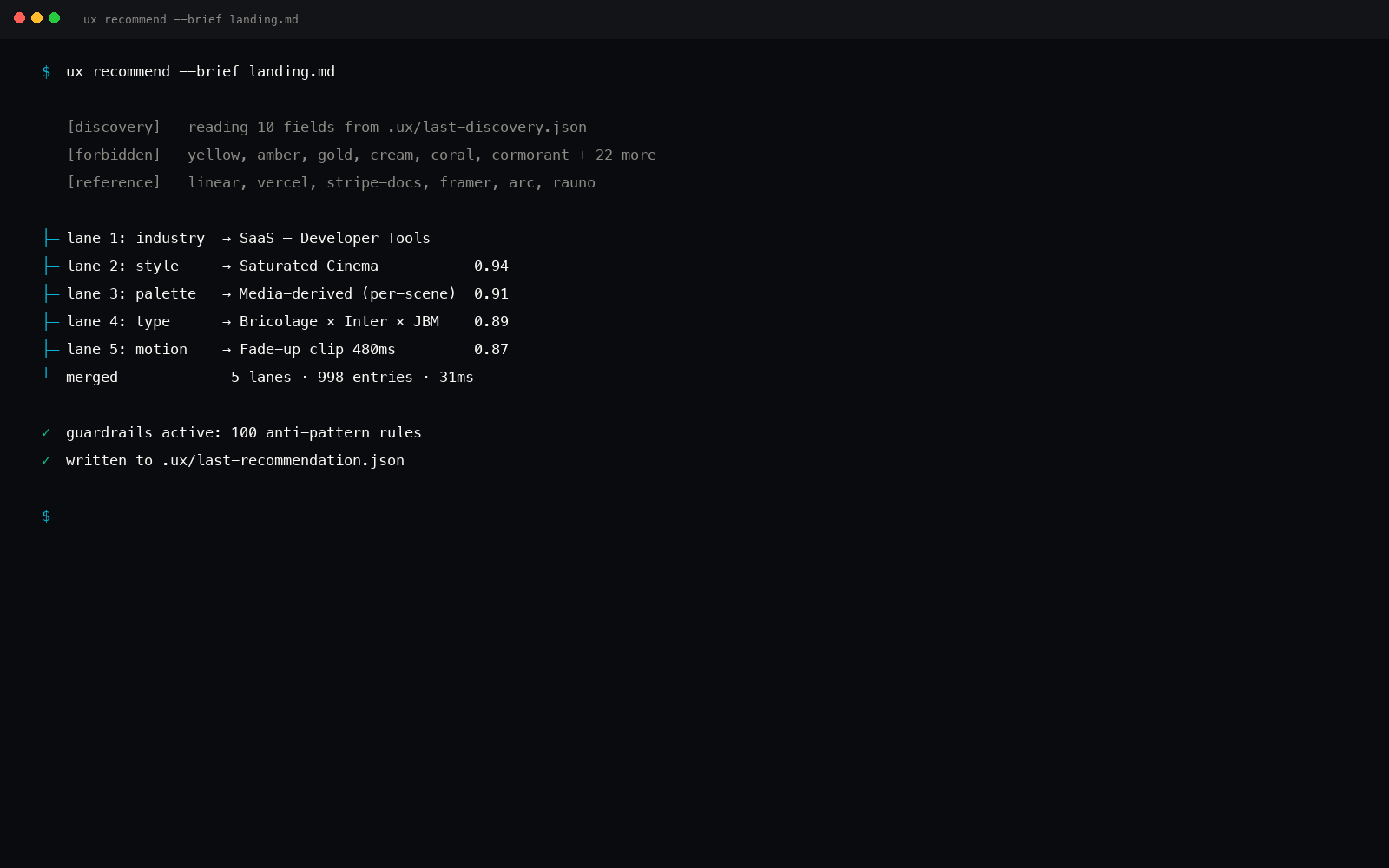
The v2 flagship. Runs the 5-parallel-search Python engine across 11 data manifests (75+ styles, 170+ palettes, 65+ type pairs, 120+ components, 170+ industries, 110+ UX laws, 50+ motion presets, 152 anti-patterns, 92 brand specs) and returns a complete recommended design system for your project: with always-on anti-slop guardrails.
**One command. Five parallel searches. One merged system out.**
User research planning: interview scripts, survey design, recruitment screener, synthesis. Triggers on "plan a research study", "I need interview questions", "design a survey", "how do I recruit users". Use when planning user research, writing interview scripts, designing a survey, creating a screener, scoping recruitment, synthesizing research data into recommendations. Skip when the user already has research data and wants synthesis (use ux-research --synthesize), the answer is already known with high confidence, low-risk reversible decisions, backend or infrastructure work.
You are running the `/ux-research` command from the `ux` plugin. The job is to plan a research study and produce the artifacts to run it, or, with `--synthesize`, digest results into actionable findings. Methodologically rigorous, anti-bias by default.
Print a snapshot of what's in the ux-skill data manifests: counts per file, version info, total entries. Useful for verifying your install and seeing how much the engine has to work with.
Propose a complete starter design system for a project that doesn't have one. Triggers on "we don't have a design system", "build us a system", "propose tokens", "what should our theme be". Use when proposing a starter design system, generating tokens / foundations / components from a brand brief, the project has no existing design system, extracting a system from an existing site. Skip when the project already has a complete design system (use ux-component to build against it), backend or infrastructure.
You are running the `/ux-system` command from the `ux` plugin. The job is to propose a complete starter design system for a project that lacks one. Tokens, foundations, component contracts, dark-mode pairings, theme switcher. Not a sketch: a usable starter.
Run a design thinking workshop / discovery session. Five sequential phases ending in a concrete Game Plan. Triggers on "run a workshop", "facilitate a discovery", "let's do a design thinking session". Use when running a discovery workshop, facilitating a design thinking session, exploring a problem space, running an exploration → heat map → stakeholder map → game plan flow, scoping a new product opportunity. Skip when the brief is already clear and scoped, the user just wants to design a single component, the team is mid-execution rather than in discovery.
You are running the `/ux-workshop` command from the `ux` plugin. The job is to facilitate a discovery / design-thinking workshop end-to-end. Five sequential phases. Time-boxed. Concrete artifacts per phase. Decision at the end, not "interesting findings."