How to add a design system to Claude Code and Cursor.
Out of the box, an AI editor has no design system, so it falls back to the average of the web: Inter, a purple gradient, three identical cards. This is the five-step setup that gives Claude Code, Cursor, and Windsurf a real system to generate against, and a linter that rejects the output when it drifts back to the default.
From the uxskill team · 6 min read · MIT-licensed open source
The short answer
Install uxskill with pip install uxskill, run ux-init to register its commands in your editor, capture a brief and your brand with /ux-discover, compile a system with /ux-recommend, then build with /ux-design and verify with /ux-audit. The engine is offline and deterministic, so every teammate generates against the same system and the same gate.
The steps below work two ways. You can point them at an existing design system, which is the right move when your team already ships tokens, or have one synthesized for the project, which is the right move when you are starting fresh and the alternative is whatever the model defaults to. Either way the install and the workflow are the same; only the command at step four changes. Everything here uses uxskill, an open-source engine that runs as a local Python process plus a thin editor adapter. It never calls a model and sends no telemetry, which is what you want from a design system: the same brief should produce the same system on every machine, not a different answer each session.
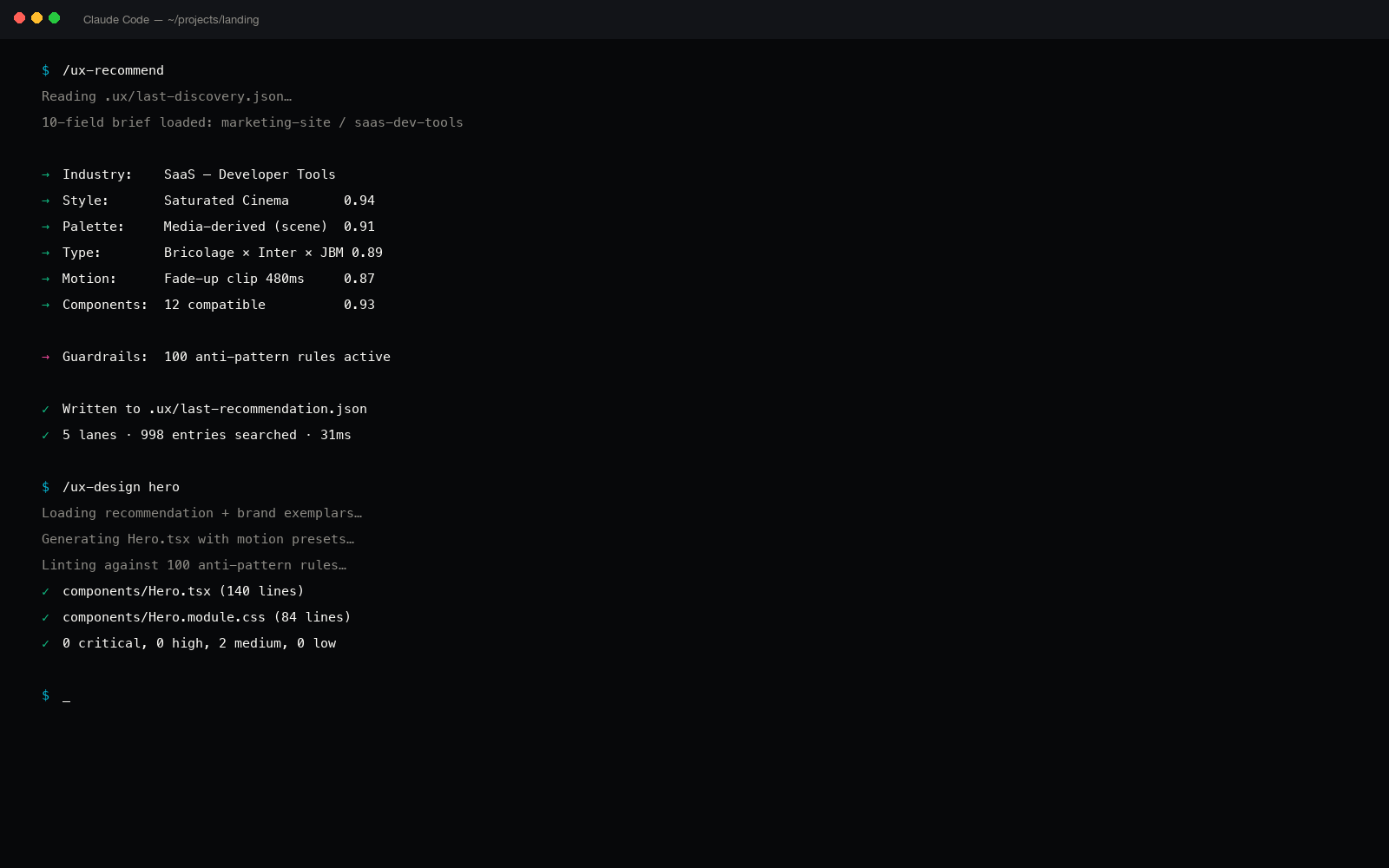
uxskill registered in Claude Code, generating against the project's own design system rather than the model's defaults.
The five steps
Step 1
Install the engine
One command from your project root. There is no account, no API key, and no signup. The pip path is the most common; the npx path is a pure Node wrapper that spawns the same Python engine with zero npm dependencies.
$ pip install uxskill# or: npx uxskill init
This puts the engine and the editor adapters on your machine. The adapter layer is editor-agnostic, which is why the same install serves Claude Code, Cursor, Windsurf, and 14 more editors without a separate package per tool.
Step 2
Register the commands in your editor
Run the init command. It detects which editor you are in and wires the 25 slash commands into that editor's command surface, so they appear when you type a slash the same way the editor's own commands do.
$ux-init# detects Claude Code, Cursor, or Windsurf
After this, typing /ux- in the editor shows the full command set. The commands you will use most for a design system are /ux-discover, /ux-recommend, /ux-system, /ux-design, /ux-component, and /ux-audit. The same commands behave identically across editors, so a habit you build in Claude Code carries to Cursor unchanged.
Step 3
Capture your brief and your brand
A design system needs to know what it is for. Run the discover command and answer ten intake fields: project type, audience, primary goal, tone, must-haves, forbidden elements, reference brands, stack, region, and the metric that defines success. This is a forcing function. It takes the vague request that produces generic output and turns it into a specific brief the engine can reason about.
$/ux-discover
Then anchor it to your brand. The engine reads your logo to pull the real primary color from its pixels and rejects default fonts in favor of the letterform your wordmark already uses. This is the step that separates a system that is yours from a system that merely looks tidy. The answers are saved to a small file in the project so every later command reads the same brief.
Step 4
Compile the design system
Now produce the system itself. If you want one synthesized for this project, run the recommend command. It merges five parallel lanes, industry, style, palette, type, and motion, and feeds a seven-axis synthesizer across warmth, contrast, density, geometry, formality, motion, and type personality to compile a design language that is novel rather than a stock theme.
$/ux-recommend# or: /ux-system to propose a starter system
The engine draws on a large body of structured data as training material rather than templates: 84 styles, 176 palettes, 70 type pairs, 148 components, 184 industry profiles, and 160 real brand specifications. The result is written to a system file your editor reads on every prompt, so generated UI inherits the tokens automatically. If your team already has a design system, point the command at it instead and skip the synthesis; the rest of the workflow is unchanged.
Step 5
Generate UI, then lint it against the system
Build screens and components with the generation commands. Because the system file is in context, the output starts from your tokens rather than the model's defaults.
$/ux-design a pricing page # /ux-component for a single element
Then verify. Run the audit command to score the output against a deterministic linter of 152 anti-pattern rules. It catches the fingerprints the model reaches for when left alone, the purple gradient, the three identical cards, emoji used as icons, and fails the result when too many appear. Wire the same check into CI and a regression cannot merge. Use /ux-fix to apply the corrections the linter recommends.
$/ux-audit ./src/pricing # non-zero exit on slop
Does this work in Cursor and Windsurf too
Yes. Claude Code, Cursor, and Windsurf are first-class adapters shipped at parity, and Copilot, Gemini, Aider, and others bring the total to 17 editors. The manifest, the engine, and the linter are shared; only the thin adapter that maps commands onto each editor's surface differs, so the workflow above is identical wherever you run it. For a single-editor walkthrough, see the Cursor design plugin guide.
Why this beats pasting a style guide into a rules file
You can paste a style guide into a system prompt or a rules file, and it helps until it does not. A prompt is advice the model drifts away from across a long session, and it has no way to fail. The difference here is the deterministic layer underneath. The system is compiled, not described, so it does not depend on the model remembering it, and the linter is a gate rather than a suggestion, so output that slides back to the defaults is caught instead of merged. For the reasoning behind a regex engine over asking a model to grade itself, see why a regex linter beats a model judge, and for the terminal-only version of this workflow, the design system CLI guide.
A realistic expectation
This raises the floor, it does not replace taste
A compiled system and a linter guarantee the output will not be generic. They do not guarantee it will be great. The engine reaches for a few deliberate moments of flourish, but the strongest results still come from a person who reviews, reacts, and pushes the second draft. Treat this as the floor your AI output cannot fall below, not the ceiling it reaches on its own. That floor is the whole value: the difference between shipping the average of the web and shipping something with a decision in it.
Give your editor a design system
One command. Seventeen editors. Offline.
uxskill is an open-source design engine for AI coding. It compiles a system anchored to your brand and lints generated UI against 152 anti-pattern rules. Deterministic, no telemetry, no account, MIT licensed.