Regex linter for AI coding: 51 rules that catch design slop in CI.
Recommenders ask the model to do the right thing. Linters punish the model when it doesn't. ux-skill ships both, but only the linter runs in your CI on every push. Here's how 51 regex rules catch the recognizable fingerprints of AI design output before they merge, with no LLM call, no prompt, and no token budget.
Why regex, not an LLM
Every alternative looks like LLM-as-judge: ask Claude or GPT to grade the output, take its word for it, retry on a low score. That approach has three problems that compound the more you use it.
It's nondeterministic. The judge model's verdict on the same input drifts run to run. CI failures become flakes, contributors learn to retry instead of fix, and the signal collapses.
It's expensive. Every PR push spends tokens. Every retry doubles the bill. A 200-PR-per-week repo running an LLM design-grader on the diff is paying for compute to confirm what a regex would catch in 12 milliseconds.
It hides the rule. When the judge fails a PR, the author gets prose. When a regex fails a PR, the author gets a pattern they can match against their own code and learn from. The first creates a culture of appeals; the second creates a culture of fluency.
The 51 rules are documented in the AI design fingerprints taxonomy, every regex paired with the why and the fix. The linter is the executable form of that taxonomy.
What the 51 rules cover
Pulled from data/anti-patterns.json in the repo. Every rule has an id, a severity (low | medium | high | critical), a category, a regex with scoped file extensions, a one-line why, and a one-line fix.
| Category | Count | What it catches |
|---|---|---|
| A11y | 12 | Missing alt text, color-only state, low-contrast pairs, click targets under 44px, no focus styles, decorative SVG without aria-hidden. |
| Content | 8 | "John Doe" placeholders, "Lorem ipsum," "Beautiful experiences," "Revolutionizing X," generic stock imagery URLs, emoji headlines. |
| Typography | 6 | Inter as display, 90px font-size at 1.0 line-height, all-caps body, sans-only stack, hairline 100-weight, no font-feature-settings. |
| Color | 6 | Purple-to-blue gradient (#7C3AED → #3B82F6 family), 600/400 default pairs, neon glow on white, three indigo shades. |
| Layout | 6 | Three equal cards in a row, "Hero + 3-up + CTA" boilerplate, full-bleed gradient hero, centered-everything axis. |
| Quality | 6 | Inline styles on production components, !important overrides, hardcoded pixel values where tokens exist, dead imports. |
| Motion | 4 | Fade-in-up on every element, no prefers-reduced-motion branch, animation longer than 500ms on hover, autoplay carousels. |
| Visual | 2 | Drop shadows on flat designs, blur backdrops without a fallback. |
| Performance | 1 | Animating top/left/width/height instead of transform. |
| Total | 51 | Up from 35 at the v2.0.0 launch; 16 added in the v2.1 alpha cycle. |
An actual rule, end to end
Here's the canonical fingerprint, Inter used as a display font, verbatim from the manifest, severity high:
// data/anti-patterns.json: entries[0]
{
  "id": "inter-as-display",
  "name": "Inter used as display font",
  "severity": "high",
  "category": "Typography",
  "detection": {
    "type": "regex",
    "pattern": "font-family:\s*['\"]?Inter['\"]?[^;}]*[;}][^{]*(?:font-size:\s*([4-9]\d|\d{3,})px|\btext-(5xl|6xl|7xl|8xl|9xl)\b)",
    "flags": "im",
    "scope": ["css", "scss", "tsx", "jsx", "vue", "html"]
  },
  "why": "Inter is a body font tuned for screen legibility at small sizes;
          deployed as display it reads as the default startup-landing fingerprint.",
  "fix": "Pair Inter (body) with a distinctive display face:
          Geist, Satoshi, Cabinet Grotesk, General Sans, Outfit, or a brand-specific variable sans."
}
The regex looks for font-family: Inter followed within the same block by font-size at 40px+ or a Tailwind text-5xl (or larger) class. The scope array limits the scan to the file extensions where the pattern matters. The why and fix render in the linter's terminal output so contributors learn why the rule exists, not just that it failed.
Running it locally
One command. Reads every file in the current directory matching the rule scopes, prints a JSON report, exits non-zero if any rule at or above the threshold fires:
# Default: gate on high + critical, scan ./
$ uxskill lint
[OK] Scanned 142 files in 412ms · 0 findings at threshold high

# Lower the gate to medium
$ uxskill lint --threshold medium

# Scan one directory
$ uxskill lint apps/web/src --threshold high

# JSON output for piping
$ uxskill lint --json | jq '.findings | length'
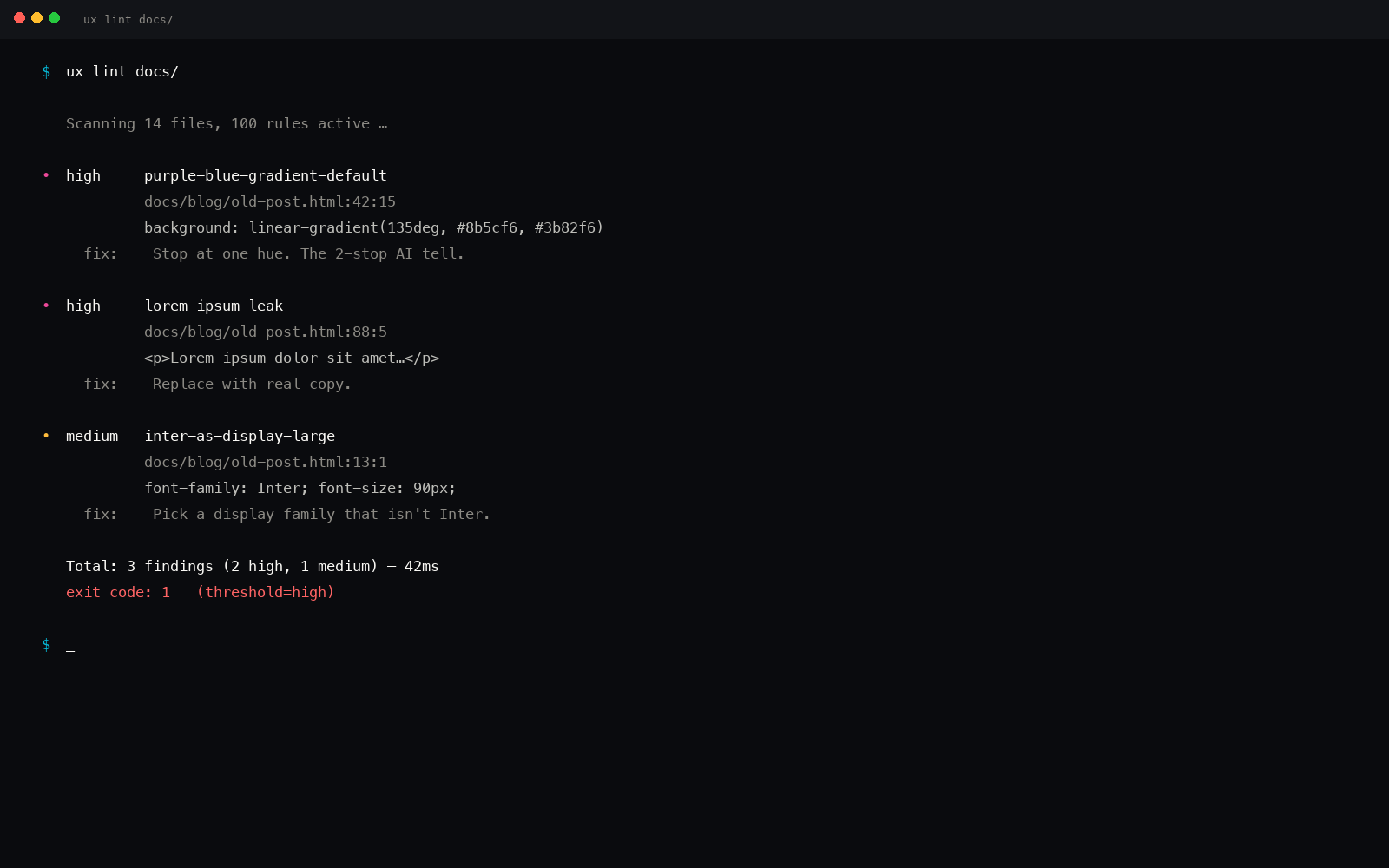
A typical real-world failure looks like:
$ uxskill lint apps/web/src
[FAIL] 4 findings at threshold high · exit 1

  high  inter-as-display          src/components/Hero.tsx:18
                                  Inter used as display font
                                  fix: pair Inter (body) with Geist / Satoshi / Cabinet Grotesk

  high  purple-to-blue-gradient   src/styles/hero.css:42
                                  Default purple-to-blue AI gradient
                                  fix: single restrained accent (Emerald, Electric Blue, Deep Rose)

  high  three-equal-card-grid     src/pages/index.tsx:96
                                  Three equal cards in a row
                                  fix: asymmetric layouts (bento, 2-and-1, 4 with one spanning)

  medium fade-in-up-everywhere    src/components/Section.tsx:24
                                  Fade-in-up applied to every direct child
                                  fix: differentiate motion by role; only animate first impression
No LLM call. Average pass on a 200-file Next.js repo: 380ms cold, 90ms warm.
GitHub Actions workflow
Drop this into .github/workflows/ux-lint.yml and every PR push blocks on the linter. The Python install is the most expensive step at ~6 seconds; the lint itself is sub-second on most repos.
# .github/workflows/ux-lint.yml
name: ux-lint

on:
  pull_request:
    paths:
      - '**/*.{tsx,jsx,vue,css,scss,html,astro,blade}'
  push:
    branches: [main]

jobs:
  lint:
    runs-on: ubuntu-latest
    steps:
      - uses: actions/checkout@v4
      - uses: actions/setup-python@v5
        with:
          python-version: '3.11'
      - run: pip install uxskill
      - run: uxskill lint --threshold high
      - if: failure()
        run: uxskill lint --json > lint-report.json
      - if: failure()
        uses: actions/upload-artifact@v4
        with:
          name: ux-lint-report
          path: lint-report.json
The JSON artifact gets attached on failure so reviewers can see every finding with line numbers without re-running the lint locally.
Pre-commit hook (catch it before the push)
For teams that run pre-commit, this gates the local commit before the diff ever leaves the laptop. The linter only scans staged files, so the average run is under 200ms.
# .pre-commit-config.yaml
repos:
  - repo: local
    hooks:
      - id: uxskill-lint
        name: ux-skill anti-pattern lint
        entry: uxskill lint --threshold high --staged
        language: python
        additional_dependencies: [uxskill]
        files: \.(tsx|jsx|vue|css|scss|html|astro|blade)$
        pass_filenames: true
Before and after on a real page
Here's a stripped hero block from a Next.js starter, lint-failing on three rules, and the rewritten version that exits 0. Same content, same conversion intent, different fingerprint.
// inter-as-display, purple-to-blue,
// three-equal-card-grid
<section className="bg-gradient-to-br
  from-purplefrom-purple-500#x2010;500 via-violet-500
  to-blue-500 py-32">
  <h1 className="font-['Inter']
    text-7xl leading-none">
    Build something amazing.
  </h1>
  <div className="grid grid-cols-3 gap-6">
    <Card icon="Zap" title="Fast" />
    <Card icon="Shield" title="Safe" />
    <Card icon="Heart" title="Loved" />
  </div>
</section>
// display face, restrained accent,
// asymmetric layout
<section className="bg-stone-50 py-28">
  <h1 className="font-['Fraunces']
    text-6xl leading-[1.04]
    tracking-tight">
    The freight-routing layer
    your TMS never shipped.
  </h1>
  <div className="grid grid-cols-12 gap-6 mt-16">
    <Card className="col-span-7"
      title="Load consolidation" />
    <Card className="col-span-5"
      title="Carrier ranking" />
  </div>
</section>
Three rules fire on the "before": Inter at text-7xl, the canonical AI gradient, and the three-equal-card pattern. The "after" pairs Fraunces (display) with Inter (body, not shown), uses a flat surface, and adopts a 7-and-5 asymmetric grid. Same intent, no fingerprint.
Linters are the only deterministic surface in an AI-assisted codebase. Every other check is probabilistic.
How it pairs with the recommender
The linter alone is reactive: it catches slop in code that already exists. The full ux-skill loop is preventative and reactive:
/ux-frame: 10-field discovery brief (the forcing function)./ux-recommend: the Python recommender runs five parallel searches and returns a system./ux-design: generate the surface against that system./ux-lint: gate the output with the 51 regex rules./ux-fix: auto-patch the findings the regex can resolve (Inter → Fraunces, indigo gradient → single accent, three-card → bento).
Steps 1-3 reduce the rate at which the model produces slop. Steps 4-5 catch what slipped through. The recommender raises the floor; the linter sets the ceiling.
Regex catches structural fingerprints, not taste.
The linter will never catch "this section is the wrong rhythm" or "the copy reads cold." Those need a human or a model. What regex does catch is every fingerprint that has a literal token, pattern, or shape, which is most of the AI defaults, because the model reaches for the same artifact every time.
We deliberately don't run an LLM judge in CI. If your bar is "looks like a designer made it," that's a code review, not a lint. ux-skill ships /ux-critique for the taste pass, but that runs in your editor on demand, not in CI.
Cross-IDE distribution
Same Python package, every IDE that runs Python or shells out to it: Claude Code, Cursor, Windsurf, Copilot, Gemini Code Assist, Aider, Continue, Cline, Roo Code, Codex, plus seven more. Windsurf install walkthrough · Cursor install walkthrough.
If you want the linter without ux-skill's recommender and brand library, the uxskill lint subcommand is self-contained: install uxskill, point at the directory, get the report. No model, no API key, no telemetry.
Related reading
- A pre-ship design review checklist for AI UI
- The accessibility holes in AI-generated UI, the a11y defects the linter catches on commit.
- The 51 AI design fingerprints every AI coding tool ships by default, the human-readable form of the manifest.
- Anti-AI-slop tools for Claude Code in 2026: the honest ranking, where the regex linter fits.
- Dogfooding ux-skill: bugs we found by using our own engine, the story of the homepage that failed its own lint.
- MCP server: the same engine inside Claude Desktop, Cursor, Windsurf.
- Roadmap: what's coming after the v2.1 rule additions.
- FAQ: how the linter behaves on monorepos and Tailwind.