Anti-AI-slop tools for Claude Code in 2026: the honest ranking.
Every AI coding tool ships the same fingerprints: Inter as display, the recognizable indigo-to-blue hero gradient, three identical cards, generic placeholder identities, "Beautiful experiences" copy. A small ecosystem of skills tries to fix it. This is what each actually does, ranked by approach, not by star count.
What "AI slop" actually looks like
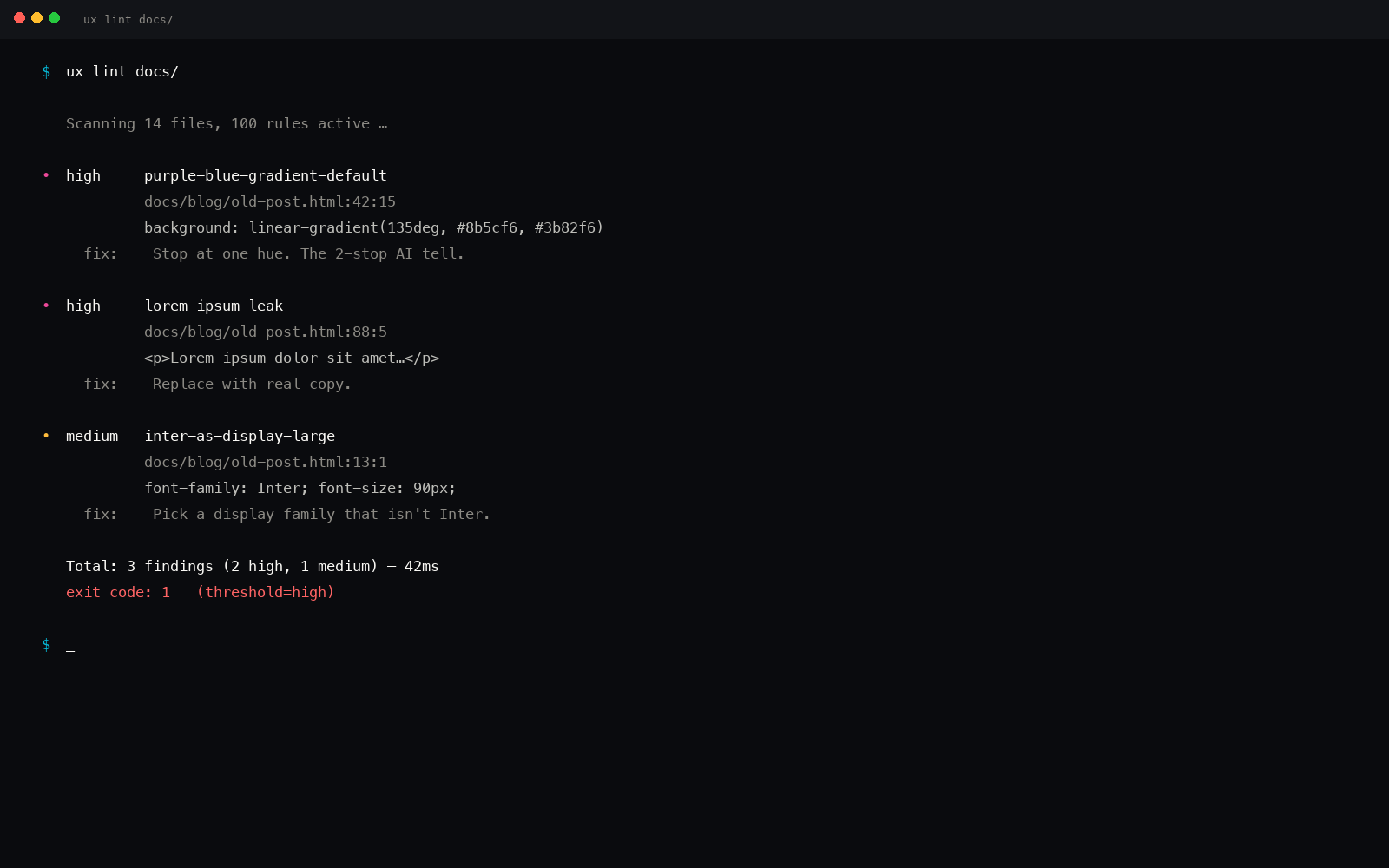
Before ranking the fixes, let's be specific about what's being fixed. AI design slop is not a vibe, it's a measurable, recurring set of patterns. ux-skill v2 catalogs 35 of them in its linter rules. The most common five:
Inter as display
Inter is a UI body font. AI defaults use it at 72px, 90px, 120px with line-height 1.0. Real display work uses a contrasting serif, a geometric grotesque, or Inter at 32px max. Linter rule: font-size > 64px && font-family: Inter.
The indigo-to-blue gradient
Purple-to-blue diagonal gradient at 135deg. It's in every AI demo, every landing page generation, every dashboard mock. Tailwind's default "indigo to blue" combo is the lazy default. Linter rule: regex matches the recognizable hex pair inside a linear gradient call.
Three identical card grids
Hero, then a three-card row with identical heights, identical icons in the top-left, identical button placement at the bottom. Visual rhythm is dead on arrival. Linter rule: detects grid-cols-3 with three near-identical card components in sequence.
Placeholder identities + "Beautiful experiences"
Generic stock names, fake test emails, classic filler paragraphs, "Beautiful experiences", "Build something amazing", "Seamless and intuitive", "Reimagine the future of." The copy gives the model away. Linter rule: regex pass over rendered text.
fade-in-up everything, 0.3s ease-out
Every element fades in from below with the same duration and easing. No staggering, no variance, no purpose. Real motion has hierarchy: hero opens, supporting content cascades, body content settles. Linter rule: scans CSS for repeated fadeInUp 0.3s ease-out across siblings.
These are five of 35. The full list catalogs heavy drop shadows on cards, blur-glass overlays on every section, identical icon weights from lucide-react default, axis-aligned 4-up bento grids, "Get started" + "Learn more" button pairs in every hero, and the rest. A taste prompt asks the model to avoid them. A linter rejects code that contains them.
The five anti-slop tools, ranked by approach
We're ranking by what each tool actually does, not by stars. Star count appears in each card. The approaches fall into three buckets: prompt-only (gives the model an instruction), variant-prompt (gives the model a flavored instruction), and deterministic (runs regex over the output and fails on violation).
1. leonxlnx/taste-skill
The brand name in the space. Owns the "anti-slop" identity. 13 variant SKILL.md files with a 3-dial mental model: DESIGN_VARIANCE, MOTION_INTENSITY, VISUAL_DENSITY. You pick a variant, it loads a flavored taste prompt.
From their README: "gives your AI good taste. stops boring slop."
Approach
Prompt with flavor selection. The 3 dials give users a memorable mental model, vary the model's defaults along three axes. No deterministic check.
Where it wins
Brand discipline. They earned the "anti-slop" identity by being early and consistent. The 3-dial framing is the clearest user model in the category.
Where it doesn't catch slop
The variants are flavors of taste, not enforcement. Same prompt produces different outputs every run because the rules live in LLM judgment. No CI gate possible. No way to assert that a fingerprint is absent from the output.
2. Nutlope/hallmark
Hassan El Mghari's "Anti-AI-slop design skill for Claude Code, Cursor, Codex." Multi-IDE skill pack with a Vercel-hosted site. Skill manifests for each environment.
From their site: "Stop building AI slop. Start building beautiful, distinctive interfaces."
Approach
Curated skill prompt distributed as a SKILL.md pack. Multi-IDE intent (Claude Code, Cursor, Codex). The skills folder is the unit; each contains taste-loaded guidance.
Where it wins
Strong brand presence from Nutlope's audience reach. Clean install across three IDEs. The taste calls in the prompt are sharp, specific bans on the recognizable fingerprints.
Where it doesn't catch slop
Same as taste-skill: prompt-based. No regex pass. The prompt sets a high bar; whether the model meets it varies. Repeated runs of the same brief produce inconsistent outputs.
3. alchaincyf/huashu-design
One large SKILL.md with referenced philosophy files and Python scripts for hi-fi prototype generation. Includes a 5-dimension review system, 20 design philosophies, and an MP4 export pipeline.
From their README (translated): "hi-fi prototypes, slides, animations, 20 design philosophies, 5-dim review, MP4 export."
Approach
Massive single-file skill with referenced data. Philosophy-first, the skill loads a chosen design school (Bauhaus, Memphis, neo-brutalism, Swiss, etc.) and generates inside that frame.
Where it wins
The philosophy library is genuinely deep. 20 named schools with rationale. The 5-dimension review (visual, structural, hierarchy, motion, copy) is a clear rubric.
Where it doesn't catch slop
The 5-dim review is rubric-shaped (1-5 scores), not deterministic. Two reviewers will score the same output differently. Catches taste, not fingerprints. No CI integration.
4. ui-ux-pro-max-skill (implicit anti-slop)
Not branded as anti-slop, but the architecture works against it: a recommender that returns a named style + palette + type pairing makes the model commit to a system rather than reach for defaults. Catalog defense is a form of slop defense.
Approach
Force a system selection before generation. The recommender returns one of ~50 styles, one of 161 palettes, one of 57 type pairings. The model can't fall back to Inter + indigo gradient if it's been handed a different system.
Where it wins
Forcing system selection works. If the recommender returns "Swiss editorial + warm cream + Cormorant/Inter pair," the model can't drift to the Inter-90px gradient stack.
Where it doesn't catch slop
The recommender doesn't audit. If the model partially ignores the system (uses the palette but reverts to Inter + 90px), nothing catches the drift. Indirect defense, not direct.
5. ux-skill v2
Catalog-driven recommender (same architecture as ui-ux-pro-max) plus a 145-rule Python linter that runs against generated code and exits non-zero on violation. The only tool in this list with a CI-ready slop gate.
From the v2 release notes: "1,182 structured entries, 100 anti-pattern regex rules, 160 brand DESIGN.md specs."
Approach
Three layers stacked: (a) force a system via the recommender, (b) specify constraints via brand specs, (c) verify output via the regex linter. If the model produces Inter at 90px, ux lint finds it and exits 1.
Where it wins
Deterministic. Same input, same output. Runs in CI. Same regex catches the same pattern every time. Composable, the 35 rules can be extended, the linter is open Python. No LLM judgment in the audit lane.
Where it loses (be honest)
14 stars vs taste-skill's 25k. We're new (v2.0.0-alpha.1 a few weeks ago). Brand awareness is the gap. The architecture is the answer.
Prompt-only vs deterministic: the approach matrix
| Tool | Approach | Catches slop at… | CI-able? | Repeatable? |
|---|---|---|---|---|
| taste-skill | Variant prompt | Generation time | No | LLM-dependent |
| hallmark | Curated prompt | Generation time | No | LLM-dependent |
| huashu-design | Philosophy-first + 5-dim rubric | Generation + review | No (rubric is human) | Rubric-dependent |
| ui-ux-pro-max | Recommender (catalog defense) | Generation time | No | Recommendation is deterministic; output isn't |
| ux-skill v2 | Recommender + regex linter | Generation + audit time | Yes, exit 1 on violation | 100% deterministic in audit lane |
CI integration: only one tool has it
The category of tooling around AI-coded design has been prompt-shaped because LLMs are how the design lands. But once the design lands, it's code. Code can be linted. ux-skill v2 is the only tool in this list that completes the loop.
In a GitHub Action, the slop gate looks like this:
Drop that in a PR check workflow and AI-coded design output gets the same treatment ESLint gives JS. The 35 rules cover typography, color, layout, copy, motion, density. They don't catch everything, taste is still LLM judgment, but they catch the recognizable defaults that scream "AI generated."
Which to pick
Three reasonable picks depending on your stage
Hackathon / weekend project, pick taste-skill or hallmark. Zero setup, prompt loads in one paste, output is "better than default." Don't overbuild.
Production interface with a known brand, pick ux-skill v2 for the brand specs (Apple, Stripe, Linear, Figma, etc.) and the deterministic lint pass. The recommender locks the system; the linter rejects drift.
You want the most-installed tool with active community, pick ui-ux-pro-max. 84k stars, weekly updates, real momentum. Pair it with ux-skill's linter if you want CI defense on top.
Two things every tool in this list agrees on
Despite different approaches, the five tools converge on two truths:
- The fingerprints are real and shared. Every tool fights the same 30-50 recognizable AI design defaults. The list isn't subjective; it's catalogable.
- Catalog over taste-prompt is the right shape. Four of the five tools in this list use structured data of some kind, manifests, philosophy files, variant SKILL.md, brand specs. Pure prompt-only is the weakest approach.
The disagreement is on where to apply the rules: at generation (prompt) or at audit (linter). Both are needed. ux-skill v2's bet is that only the audit lane is deterministic enough to gate a CI pipeline.
Taste lives in the model. Slop lives in the output. A prompt fights taste. A linter fights slop.
If you only install one
For a working developer shipping AI-coded design into production: install ux-skill v2 for the linter and pair it with whatever prompt-side tool fits your IDE. The combo gives you forcing-function recommendation, brand-language constraints, and a CI gate on the result.
For a designer prompting for taste in a single Claude conversation: install taste-skill or hallmark. They land the most aesthetic improvement per minute of setup.