ux-skill FAQ · 25 questions, answered straight.
Common questions about install, comparison to other plugins, the linter, brand specs, RTL, dark mode, license, and contribution. Two-to-four sentences each. If something is missing, file it at github.com/Laith0003/ux-skill/issues and the next pass will include it.
What is ux-skill?
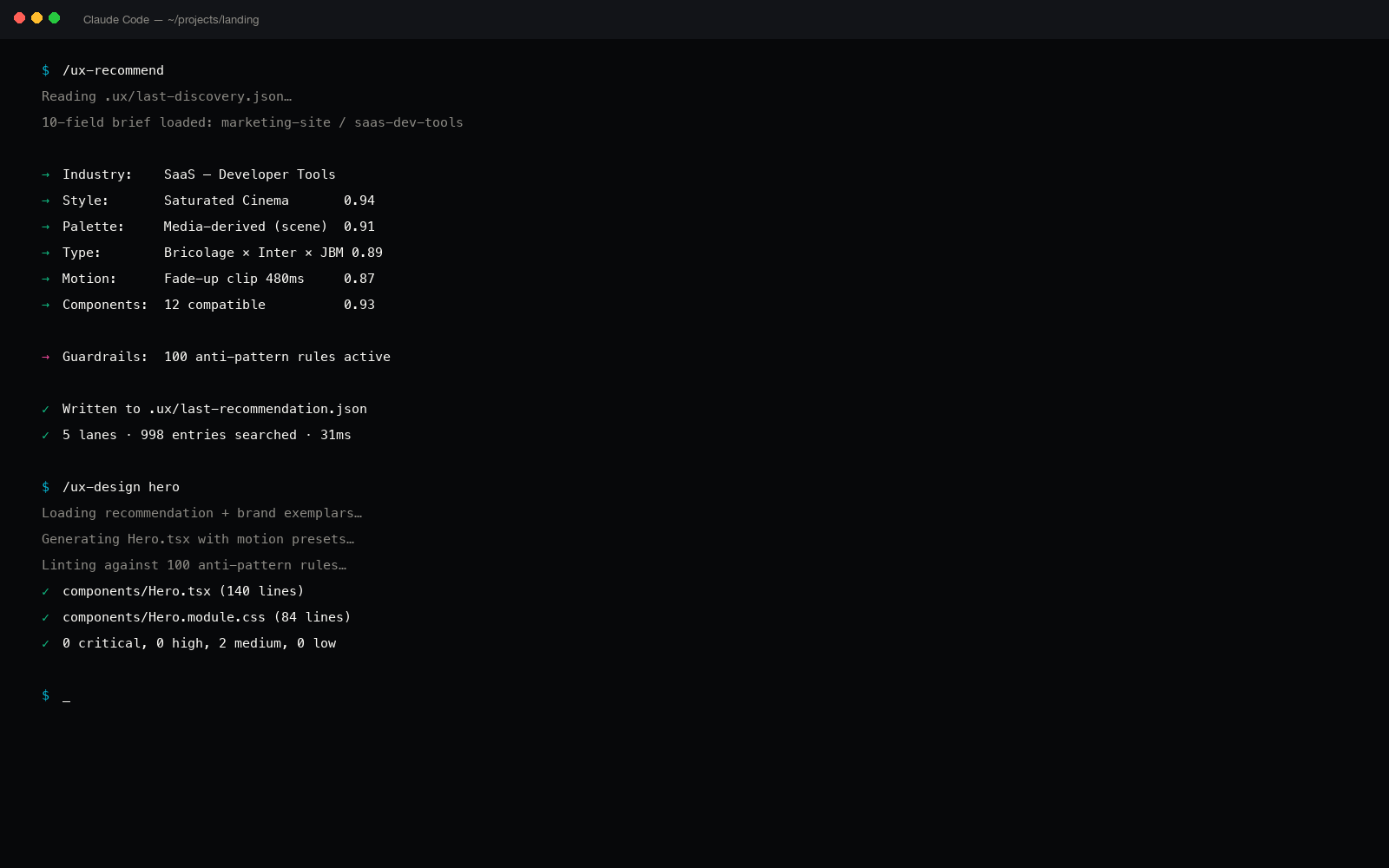
ux-skill is an open-source Python design engine that runs inside AI coding tools like Claude Code, Cursor, and Windsurf. It provides 22 slash-commands, 1,161 manifest entries across nine YAML manifests, 160 brand specs, and a 100-rule anti-slop linter.
The job it's hired to do: catch the design fingerprints every LLM produces by default (purple gradients, generic SaaS cards, three-tier pricing, default-Inter typography) before they reach your repo.
How is ux-skill different from ui-ux-pro-max-skill?
ui-ux-pro-max-skill (nextlevelbuilder, 84k stars) is a single-purpose recommender. It scores intent against a catalog and returns a structured plan. It's the canonical recommender pattern in the ecosystem.
ux-skill borrows that pattern and adds three things it does not have: a 100-rule anti-slop linter that runs in CI, a 72-brand spec library, and cross-IDE adapters for 17 editors. The scored side-by-side is at /compare.html. We score 44/50, ui-ux-pro-max scores 28/50.
How is ux-skill different from Leonxlnx/taste-skill?
taste-skill is one 50KB SKILL.md with the strongest anti-slop voice in the ecosystem. As a single prompt artifact it is exceptional: it refuses purple, refuses centered heroes, refuses generic feature grids in language clearer than most design briefs.
ux-skill takes that principle and explodes it into a system: 35 enforceable linter rules, a 1,243-entry manifest, 22 slash-commands, and a runtime CLI. taste-skill is a great prompt; ux-skill is a great prompt + the infrastructure to enforce it across an engineering workflow.
How is ux-skill different from open-design?
open-design (nexu-io, 54k stars) is closer to a Figma-style design tool with a preview server and a README localized into 11 locales. Their strength is the preview UX and the multi-locale onboarding.
ux-skill is a code-side enforcement layer. It does not have a preview tool today (v2.3 adds one) and it ships English-only today (v2.2 adds 11 locales). They're complementary, not competing: open-design wins on preview, ux-skill wins on shipping discipline and CI integration.
Does ux-skill work in Cursor?
Yes: Cursor is a first-class adapter, shipped at parity with Claude Code. After npx uxskill@alpha init, the 22 slash-commands appear in Cursor's command palette and behave identically.
There is no vendor lock-in to Anthropic. The manifest layer is editor-agnostic; only the thin adapter shim wires up commands to the editor's surface.
Does ux-skill work in Windsurf?
Yes. Windsurf is also a first-class adapter alongside Claude Code and Cursor. Same install, same commands, same linter, same brand specs.
If you switch from Cursor to Windsurf mid-project, your .uxskill config moves with the repo and the commands pick up where you left off.
Does ux-skill work in GitHub Copilot?
Yes, via the Copilot Chat adapter. Copilot's command surface is more limited than Claude Code or Cursor, but the core commands work: /ux-design, /ux-component, /ux-audit, /ux-fix.
The anti-slop linter is a separate CLI binary (npx uxskill lint) and runs independently of which editor you use, so even on Copilot, your CI still catches the fingerprints.
How do I install it?
One command from your project root:
npx uxskill@alpha initThe init detects your editor, installs the right adapter, registers the 22 slash-commands, downloads the manifests, and offers to wire the linter into your pre-commit hook. No account, no API key, no signup. Average install time is under 40 seconds.
Is it free?
Yes. Permanently. There is no paid tier, no Pro plan, no premium brand pack, no commercial-use surcharge. The roadmap explicitly forbids ever charging.
"Free" includes commercial use: the MIT license lets you ship ux-skill inside a paid product, charge customers for that product, and never pay or attribute upstream.
Is it open source? What license?
MIT. The most permissive standard license. Use it commercially, fork it, modify it, ship it inside a paid product, sell that product. No attribution required, no field-of-use restriction, no carve-outs.
The repository is at github.com/Laith0003/ux-skill. Full license text in the repo root.
Does it collect any telemetry or data?
The tool: no. Zero. The CLI does not phone home. No usage events, no error reporting, no anonymous IDs, no install pings. The only network calls are to PyPI for the package install and to your local AI coding tool for the prompt itself.
This is checked in the linter's own CI: any new network call introduced in a PR has to be justified and is rejected by default. Telemetry-free is a non-negotiable design constraint for the tool.
This marketing website is separate: uxskill.laithjunaidy.com uses privacy-respecting Google Analytics for aggregate traffic only. No personal data, no advertising, no selling. Full detail in the privacy policy.
What's a "design fingerprint" and why does ux-skill catch them?
A design fingerprint is a pattern so common in AI-generated UI that it functions as a watermark. Purple-to-blue gradients in hero backgrounds. Three-column pricing cards. Default Inter typography paired with itself. Lucide icons in feature grids. Centered single-column landing layouts.
The model isn't broken. It's averaging across millions of training screenshots. ux-skill catches the fingerprints by giving the model 35 explicit refusals up front and 998 manifest entries to choose from instead. The default attractor gets blocked; the model has to commit.
What's the anti-slop linter, exactly?
An 152-rule pattern checker that scans your HTML, CSS, JSX, Vue, and Svelte files for known AI-design fingerprints. Each rule has a regex or AST matcher, a severity (warn / error), and a recommended fix link into the brand spec library.
Sample rules: ban purple-to-blue gradients (CSS regex), require non-default type pairings, refuse emoji in user-facing strings, flag three-tier pricing without a stated reason, block border-radius: 12px defaults without brand justification. Run with npx uxskill lint.
Can I run the linter in CI?
Yes: that's the primary use case. The linter is a standalone CLI that exits non-zero on any error-severity violation, so it slots into any CI pipeline without configuration.
# GitHub Actions
- run: npx uxskill lint --ci

# Pre-commit hook (auto-wired by init)
npx uxskill lint --staged
The init script offers to wire it into .husky/pre-commit automatically. Average lint time on a 200-file project is under 400ms.
What's the 5-parallel-search recommender?
When you run /ux-design, ux-skill kicks off five parallel searches across the manifest: brand-fit, style-fit, component-fit, motion-fit, anti-pattern-fit. Each returns scored matches; results are merged and returned as a single structured plan with explicit refusals attached.
The pattern comes from ui-ux-pro-max-skill. ux-skill adds the fifth dimension (anti-pattern-fit) so the plan tells the model what to avoid, not just what to choose.
What are the 160 brand specs?
72 DESIGN.md-style spec files under references/brands/, one per known brand identity. Apple, Stripe, Linear, Vercel, Notion, Airbnb, Figma, Replit, Anthropic, plus 63 more.
Each spec encodes that brand's allowed typography pairings, color usage rules, motion vocabulary, and explicit anti-patterns (e.g. Stripe brand spec forbids serif body type and warns on heavy drop shadow). Pick a brand with /ux-design --brand=stripe and the recommender narrows everything to brand-compliant choices.
How do I generate a landing page with ux-skill?
Run /ux-design landing in your editor. ux-skill first triggers the discovery protocol: 10 fields of intent (audience, primary action, brand voice, motion appetite, RTL, dark mode, stack, success metric, scope, time budget). Improvisation is banned; the model cannot skip the protocol.
Once the 10 fields are filled, the recommender returns a structured plan: recommended hero variant, pricing structure, social proof pattern, motion vocabulary, and an explicit list of anti-patterns to avoid. The model then generates code with that plan as its context.
How do I generate a dashboard?
Same flow with /ux-dashboard. The discovery protocol shifts to dashboard-specific fields: primary metric, density preference, table-vs-chart bias, refresh model, role hierarchy, status taxonomy.
The recommender returns layout, information architecture, chart-type per data shape (e.g. for share-of-volume it picks stacked area, not pie), and a list of dashboard anti-patterns: sparkline-bingo, KPI-card-overload, generic-icon-grid, default-blue-everywhere.
Can ux-skill design for RTL / Arabic?
Yes: RTL is a first-class field in the discovery protocol. When set, the recommender returns RTL-aware layouts, mirrored animation contracts (a right-to-left slide-in becomes left-to-right), locale-correct number formatting, and font choices that have full Arabic glyph coverage.
This is dogfood: ux-skill's maker runs Dot, a MENA-first product where Arabic is the primary locale. The MENA brand pack (Careem, Talabat, Noon, Aramex, +24) ships in v2.2.
Can it handle dark mode?
Yes. Every brand spec encodes both a light and a dark variant. Dark mode is not an inverted-light fallback. Each brand has explicit dark tokens, dark motion rules, and dark anti-patterns.
The dark anti-patterns block the usual traps: #000-on-#000 contrast traps, neon overuse, glow-as-default, "just invert the lightness" color picks. Switch contexts mid-design with /ux-design --theme=dark.
What stacks does it support?
Generation output supports React + Tailwind, Vue + Tailwind, Svelte, vanilla HTML/CSS, and Astro out of the box. Pass the stack as a flag: /ux-design --stack=svelte.
The anti-slop linter is stack-agnostic (it lints the rendered HTML/CSS output, not the source framework) so it works on any stack including ones not in the generator list. Swift, Kotlin, and Flutter generators are planned for v3.0.
Can I add my own anti-pattern rule?
Yes. Drop a YAML file in references/anti-patterns/ with a name, severity, regex or AST matcher, and a recommended-fix link. Open a PR if it's generally useful or keep it private to your repo.
The manifest loader picks up any well-formed entry without a code change. If your rule fires false-positive on existing code, the linter offers a --baseline command to lock in current state before going strict.
Can I add my own brand DESIGN.md spec?
Yes. Add a DESIGN.md under references/brands/<your-brand>/ following the schema in the existing 72 specs (color tokens, type pairings, motion vocabulary, anti-patterns, dark variant).
The recommender picks it up automatically. If your brand is general-purpose enough to help others, send a PR. The brand library grows by community contribution after the initial 72.
Who built ux-skill?
Laith Aljunaidy, solo founder of Dot, a MENA-first loyalty platform live at thedotwallet.com. ux-skill is the design discipline that runs every Dot screen, packaged so other builders can install it.
Full story at /about.html. The short version: he was tired of opening a fresh Claude Code session and shipping landing pages with purple-to-blue gradients that the model wrote first.
How do I get help or report a bug?
File an issue at github.com/Laith0003/ux-skill/issues. Real bugs get triaged within a week. For open-ended questions, use GitHub Discussions.
There is no Discord, no Slack, no Telegram, no email support queue. The open repo is the only channel and that's intentional. Every reply lives in the open so the next person with the same question finds it via search.
Install in 40 seconds, or read the compare table.
The compare table is where most people land. It scores ux-skill against the top 9 plugins on 10 dimensions, every cell filled with real data. The install is a single npx command.