From Figma to code without losing the design system.
The Figma file has the tokens. The AI session does not. Figma MCP imports a frame; Cursor and Claude Code write the components; the design system drifts somewhere in the middle. ux-skill is the bridge, one tokens.css both sides agree on, a 1,243-entry catalog the recommender draws from, and 145 deterministic rules that catch drift before it merges.
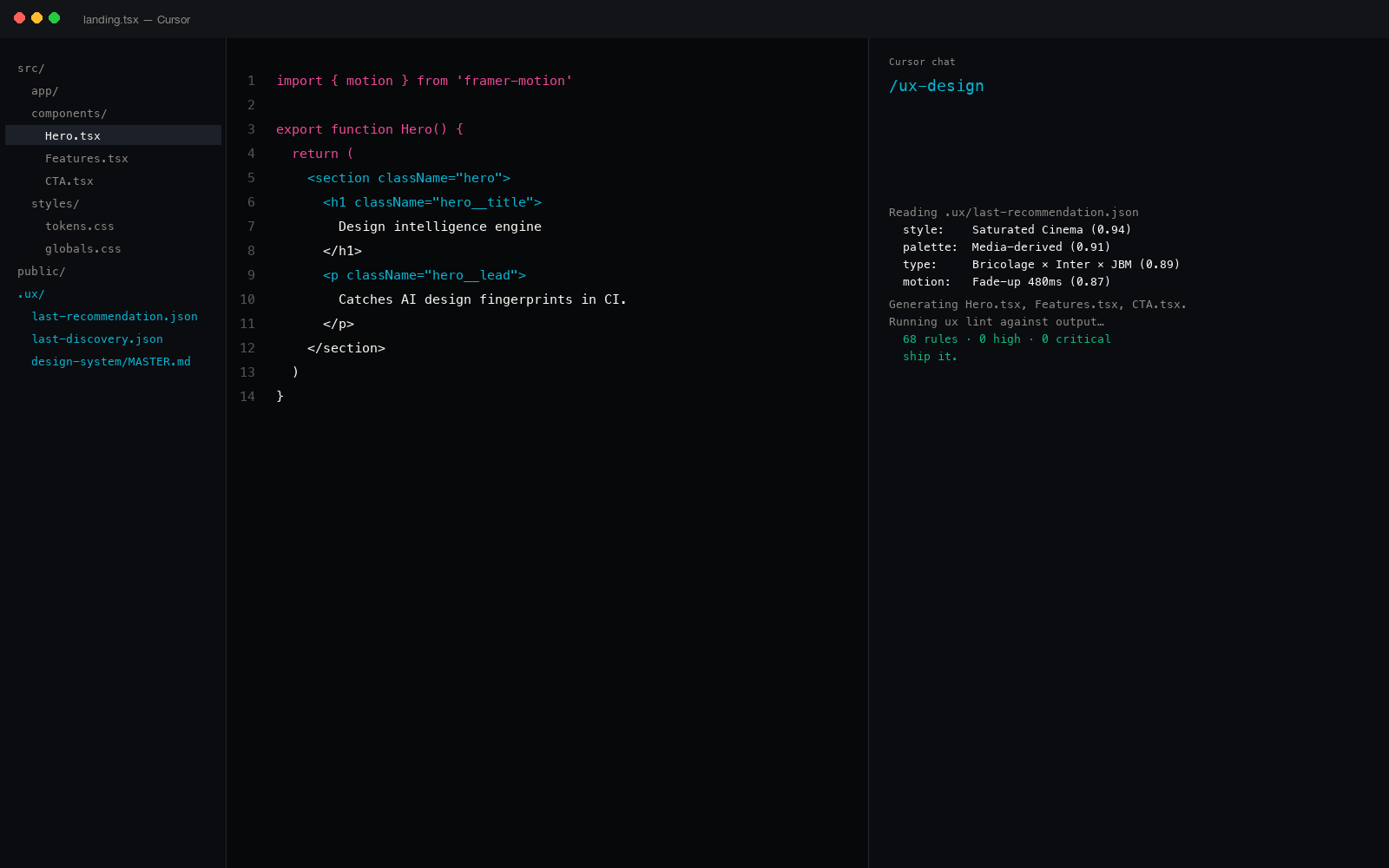
The handoff problem in 2026
Two new tools enter the design-to-code pipeline this year. Figma's MCP server exposes file frames to AI coding sessions over the Model Context Protocol; AI coding tools (Cursor, Claude Code, Windsurf, GitHub Copilot, Cline, Continue, JetBrains AI Assistant) consume that context and emit components. On paper, the handoff is clean. In practice, the system drifts at every step.
Three places the drift shows up. First, the AI session reads a Figma frame as pixels, not tokens, a 16px radius in the file becomes a hardcoded border-radius: 16px; in the output, not var(--radius-md). Second, the model defaults reassert themselves the moment the frame ends, Inter at 90px for the next h1, a purple-to-blue gradient for the next CTA, three equal cards for the next features block. Third, the auditing surface that would catch this drift in a code review doesn't exist. Designers don't read PRs; engineers don't reopen the Figma file. The system erodes through hundreds of small handoffs.
The fix is not "use the Figma MCP harder" or "write a stricter prompt." The fix is a deterministic floor that both sides agree on, a token file the design system owns, a recommender that reads it before generating, and a linter that gates every PR push against it. That's what ux-skill is.
How the bridge actually works
ux-skill ships a Python engine (998 catalog entries, 152 anti-pattern rules, 160 brand specs, 25 commands across 17 IDEs), an MCP server (18 tools), and a CLI (uxskill discover, uxskill recommend, uxskill design, uxskill lint, uxskill fix). The bridge between Figma and code is four files the engine reads and writes:
| File | Owner | Role in the bridge |
|---|---|---|
tokens.css | Design system | Source of truth for color, spacing, radius, type scale, motion. Exported from Figma variables; consumed by both the AI session and the linter. |
manifest.json | ux-skill engine | Resolved recommendation: which palette, which type pair, which motion profile, which component primitives the brief landed on. |
MASTER.md | ux-skill engine | Human-readable system narrative. The AI session reads it before writing. Includes the why, not just the what. |
anti-patterns.json | ux-skill engine | 145 regex rules. The linter runs them on every push. Catches Inter-as-display, purple-to-blue gradient, three-equal-card grid, plus 97 more. |
The Figma file owns one of these (tokens.css, exported via Figma variables or a script against the variables API). The ux-skill engine owns the other three. Both sides read the same tokens; both sides reject output that contradicts them.
An actual handoff, end to end
Here's a real flow on a checkout page. The Figma file has the design; an engineer needs to ship the component; the AI session does the writing; the linter gates the merge.
Step 1: export Figma variables to tokens.css. The official Figma Variables REST API returns the resolved values for every variable in a file. A 40-line script flattens them into a single CSS custom-properties block:
/* tokens.css, exported from Figma variables 2026-05-28 */
:root {
  /* Color (Saturated Cinema palette) */
  --canvas: #07080a;
  --surface-1: #0d0f12;
  --ink: #f6f7f9;
  --body: #c7ccd3;
  --scene-accent: #818cf8;

  /* Spacing (4px base, 1.5x ramp) */
  --space-1: 4px;
  --space-2: 8px;
  --space-4: 16px;
  --space-6: 24px;
  --space-12: 48px;

  /* Radius */
  --radius-sm: 6px;
  --radius-md: 12px;
  --radius-lg: 22px;

  /* Type (Bricolage display, Inter body) */
  --display: 'Bricolage Grotesque', system-ui, sans-serif;
  --body-face: 'Inter', -apple-system, system-ui, sans-serif;
  --text-h1: clamp(40px, 5.5vw, 64px);
  --text-body: 17px;
}
Step 2: hand tokens.css and the Figma frame to the AI session. Through the Figma MCP server, the frame goes in as structured layer data; through the file system or a context block, the tokens go in as CSS. The session is now grounded.
Step 3: write the component. The AI session emits a React component. Without the bridge, the output hardcodes pixel values and reaches for model defaults. With the bridge, it references tokens by name.
// hardcoded values, model defaults
<section style={{
  background: 'linear-gradient(135deg,
    #7C3AED, #3B82F6)',
  padding: '80px 24px',
  borderRadius: '16px'
}}>
  <h1 style={{
    fontFamily: 'Inter',
    fontSize: '72px',
    lineHeight: 1
  }}>
    Build a working product.
  </h1>
</section>
// tokens by name, display face honoured
<section className="hero">
  <h1 className="hero__title">
    The freight-routing layer
    your TMS never shipped.
  </h1>
</section>

/* hero.css */
.hero {
  background: var(--surface-1);
  padding: var(--space-12) var(--space-6);
  border-radius: var(--radius-lg);
}
.hero__title {
  font-family: var(--display);
  font-size: var(--text-h1);
}
Step 4: gate the push with uxskill lint. The linter scans the staged files against the 145-rule manifest. The "without bridge" version fires three high-severity rules: inter-as-display, purple-to-blue-gradient, filler-marketing-verbs. The "with bridge" version fires zero. The merge proceeds.
What Figma MCP does and does not solve
Figma's MCP server, released in early 2025 and stabilized through 2026, exposes a file's frames and layer tree to any MCP-aware client. Cursor, Claude Desktop, Windsurf, Continue, Cline, Zed, and a dozen others can read a frame and reason about it. That's a real step forward, and it's the right primitive, but it only solves one half of the handoff.
Figma MCP gives the AI session access to the design. It does not give the session access to the system. The design is one screen, one frame, one composition. The system is the tokens, the type pairs, the spacing scale, the motion language, the rules of what does not exist in this brand. A frame can be on-system or off-system; without the system in the same context window, the AI session can't tell the difference and will not consistently reach for tokens when the frame's pixels match a hardcoded value.
ux-skill complements Figma MCP. The MCP server provides the frame; ux-skill provides the system (the tokens.css, the MASTER.md narrative, the recommender's resolved manifest.json, and the 145-rule lint). Together, the AI session has both the picture and the grammar.
The 998 catalog entries: what's in there
The recommender's catalog is the most-asked-about piece. Pulled from data/registry.json, the 1,243 entries are partitioned across nine lanes the engine searches in parallel:
| Lane | Count | What's catalogued |
|---|---|---|
| Industries | 161 | Verticals from logistics to legaltech, each with a default tone profile and pattern set. |
| Styles | 50 | Aesthetic profiles, editorial cinema, swiss minimal, brutalist warm, mid-mod, neo-pop, etc. |
| Palettes | 161 | Color systems with hue, saturation, contrast, dark-mode treatment, semantic mapping. |
| Type pairs | 57 | Display + body combinations vetted for legibility, screen rendering, and license footprint. |
| Motion presets | 57 | Framer Motion, GSAP, and CSS snippets with prefers-reduced-motion branches. |
| Components | 182 | Patterns from cards to dialogs to dashboards, with composition rules. |
| Brand specs | 110 | Reference systems from Stripe to Airbnb to Vercel, the grammar of working brands. |
| Anti-patterns | 145 | The 145 rules the linter enforces. Same JSON, two consumers. |
| Misc taxonomies | 120 | Density profiles, voice registers, layout grammars, density adjustments, RTL deltas. |
| Total | 998 | One JSON tree. Loaded into the recommender, the linter, and the MCP server. |
The number that matters most for the Figma bridge is 160 brand specs. When you brief the recommender with "an editorial fintech, dense data, calm voice," it can land on a resolved system that reads like a real brand because it has 110 real brands to draw from, not synthesized AI defaults.
The four-step bridge as a workflow
The full loop, automated where it can be, ritualized where it can't:
- Export Figma variables to
tokens.css. Run as a CI job on the Figma file's update webhook, or as a manual command before a sprint kickoff. - Run
uxskill discoveragainst the brief that already exists (the product spec, the design intent doc). 10 fields, no improvisation, the discovery protocol is in references/process/discovery-protocol.md. - Run
uxskill recommend. Five parallel searches over the 1,243 entries return one resolved system. TheMASTER.mdwrites itself. - Run
uxskill lintin pre-commit and CI. The 145 rules gate every push. The Figma file's tokens are present; the AI session honoured them; the linter confirms it.
Where this fits in your stack
ux-skill ships across 17 IDEs through three install paths: a Claude Code plugin (/plugin install ux@ux-skill), a Python package (pip install uxskill), and an MCP server (npx uxskill@alpha mcp). The same engine reaches Claude Desktop, Cursor, Windsurf, Continue, Cline, Roo Code, Codex, Aider, Zed, JetBrains AI Assistant, GitHub Copilot, Gemini Code Assist, and the rest.
If you're already using Figma MCP, keep using it. ux-skill is additive. If you're already using a token-export pipeline like Style Dictionary or Specify, ux-skill reads whatever tokens.css you produce. The bridge is not opinionated about the source; it's opinionated about the destination (a single file, custom properties, no JS).
Figma MCP gives the AI the frame. ux-skill gives the AI the grammar.
How it pairs with the rest of the design loop
The bridge alone is reactive, it catches drift in code that already exists. The full ux-skill loop is preventative and reactive, the same five-step pattern documented in the regex linter post:
/ux-frame, 10-field discovery brief (the forcing function)./ux-recommend, Python engine runs five parallel searches and returns a system./ux-design, generate the surface against that system, with the Figma frame as supporting context./ux-lint, gate the output with 145 regex rules./ux-fix, auto-patch findings the regex can resolve (Inter to display face, indigo gradient to single accent, three-card grid to bento).
Steps 1 to 3 reduce the rate at which the model produces drift. Steps 4 to 5 catch what slipped through. The recommender raises the floor; the linter sets the ceiling.
The bridge does not replace a designer.
If you have a designer on the team, they own the Figma file. ux-skill makes the system they built durable through the AI handoff. It does not generate the Figma file, does not draw frames, and does not replace the taste call on a hero composition.
If you don't have a designer, ux-skill's recommender gets you to a defensible system from a written brief. The output is not Figma-quality polish, it's a working system you can hand to an AI session and not lose in translation. The taste call still needs a human or a sharper tool.
What this means for shipping
The handoff between design and code is the place every system erodes. The Figma MCP and the AI coding tools each solve half the problem; ux-skill closes the gap. One tokens.css both sides agree on. One 1,243-entry catalog the recommender draws from. One 145-rule lint that catches the drift before merge. 25 commands across 17 IDEs that surface the same engine wherever you write code.
14 GitHub stars at the time of writing. That's the floor we're starting from, for comparison, ui-ux-pro-max sits at 84k and taste-skill at 25k. The asymmetric move is not the star count; it's that ux-skill is the only one of the three that runs in CI as a non-zero exit. The other two ship recommenders. ux-skill ships a recommender, a linter, an MCP server, and the bridge between them.
Related reading
- Figma MCP vs ux-skill, the full side-by-side, when to use each, when to use both.
- Python design system generator, the 5-parallel-search engine, what's running underneath
uxskill recommend. - Regex linter for AI coding, 145 rules in CI, the deterministic floor under the bridge.
- Monorepo design system with AI coding, one
tokens.cssacross every package. - MCP server, 18 tools any agent can call, the protocol surface.