Redesign an existing website with AI, the full ux-skill workflow, from install to a brand-true result.
You don't need a blank page. Point ux-skill at a site you already run. It reads the brand off the live page, anchors a design system to it, rebuilds the page, and fails the build if the output drifts off-brand or into AI-slop. Here is the exact command order (install to ship) with a real before-and-after: a UK commercial skip-hire lead-gen page.
The mental model
Most "AI redesign" tools do one thing: hand you a page that looks nicer than yours. The trouble is that nicer almost always means generic: the same centered hero, the same blue-to-purple gradient, the same three identical cards every model was trained to ship. You trade your brand for the average of the internet.
ux-skill inverts that. The pipeline is four moves: extract your brand from the live page, pick a design system anchored to it, rebuild the page inside that system, and gate the result against both off-brand drift and a 152-rule anti-slop linter. The output is meant to read as your site, leveled up, not a template wearing your logo.
It runs offline, calls no LLM in the engine, and is deterministic: the same brief produces the same system, byte for byte. The AI does the building; the engine sets and enforces the constraints.
Step 0: install ux-skill
Three install paths, one engine. If you live in Claude Code, the plugin gives you the /ux-* slash commands. If you want the CLI in CI or a Python/Node project, use pip or npx.
| Where you work | Install | You get |
|---|---|---|
| Claude Code | /plugin install ux@ux-skill | 25 slash commands, 5 sub-agents, 18 MCP tools |
| Any Python project | pip install uxskill | The uxskill CLI + engine |
| Node / no Python | npx uxskill@latest | Same engine, self-contained runtime |
Inside Claude Code, the plugin install is two lines:
# add the marketplace, then install the plugin
/plugin marketplace add Laith0003/ux-skill
/plugin install ux@ux-skill
The commands register on the next session. (On an older Claude Code build that tries SSH for a bare owner/repo, add the marketplace with the full HTTPS URL instead: /plugin marketplace add https://github.com/Laith0003/ux-skill.)
The command order, at a glance
For an existing site the order matters: each command writes state into .ux/ that the next one reads. Run them top to bottom:
/ux-init: bootstrap ux-skill in the project. Detects your IDE, installs the artifacts, validates the Python engine, prints a stats snapshot of the manifests./ux-audit <your-url>: a six-lens review of the page you have now. This is your baseline: where the hierarchy fails, which AI-slop tells are already present, what to fix against./ux-discover: the 10-field intake. Audience, primary goal, tone, must-haves, and a forbidden list. The brief is the contract; everything downstream keys off it./ux-recommend: the 5-parallel-search engine returns a complete design system anchored to your brand: palette from your logo's pixels, type pair, components, motion, plus the active anti-slop guardrails./ux-design: rebuild the page against that system. The frontend-engineer sub-agent generates production HTML/CSS, brand-true, using the real content your audit captured./ux-evolve: the auto-loop: lint → polish → re-lint until the deterministic score clears 90. No hand-tuning./ux-a11y+/ux-motion: a WCAG 2.1 AA audit and a motion pass (timing, easing, reduced-motion). The things a screenshot hides./ux-lint: the final gate. The 152-rule anti-slop linter must report 0 high before you ship.
Two shortcuts worth knowing: /ux-image-to-code turns a screenshot of any page into a brief (useful when you can't point at a live URL), and /ux-critique gives a fast, opinionated taste call instead of a full audit.
Why brand extraction is the whole game
The step that separates a redesign from a re-skin is the brand anchor inside /ux-recommend. The engine reads your existing page (the logo's actual pixels, the heading font, the dominant accent) and pins the new system's primary color and letterform to them. A brand-fidelity hard floor then fails any generated output that drops your color or logo, or that drifts toward the tool's own house style.
That floor is the reason ux-skill can't quietly hand you a generic page: if the result doesn't carry your brand, it doesn't pass. Which brings us to the proof.
Case study: Instant Skip Hire
We ran the exact workflow above against a real UK lead-gen page: the commercial skip-hire page at instantskiphire.com. No design brief from the client, just the live URL.
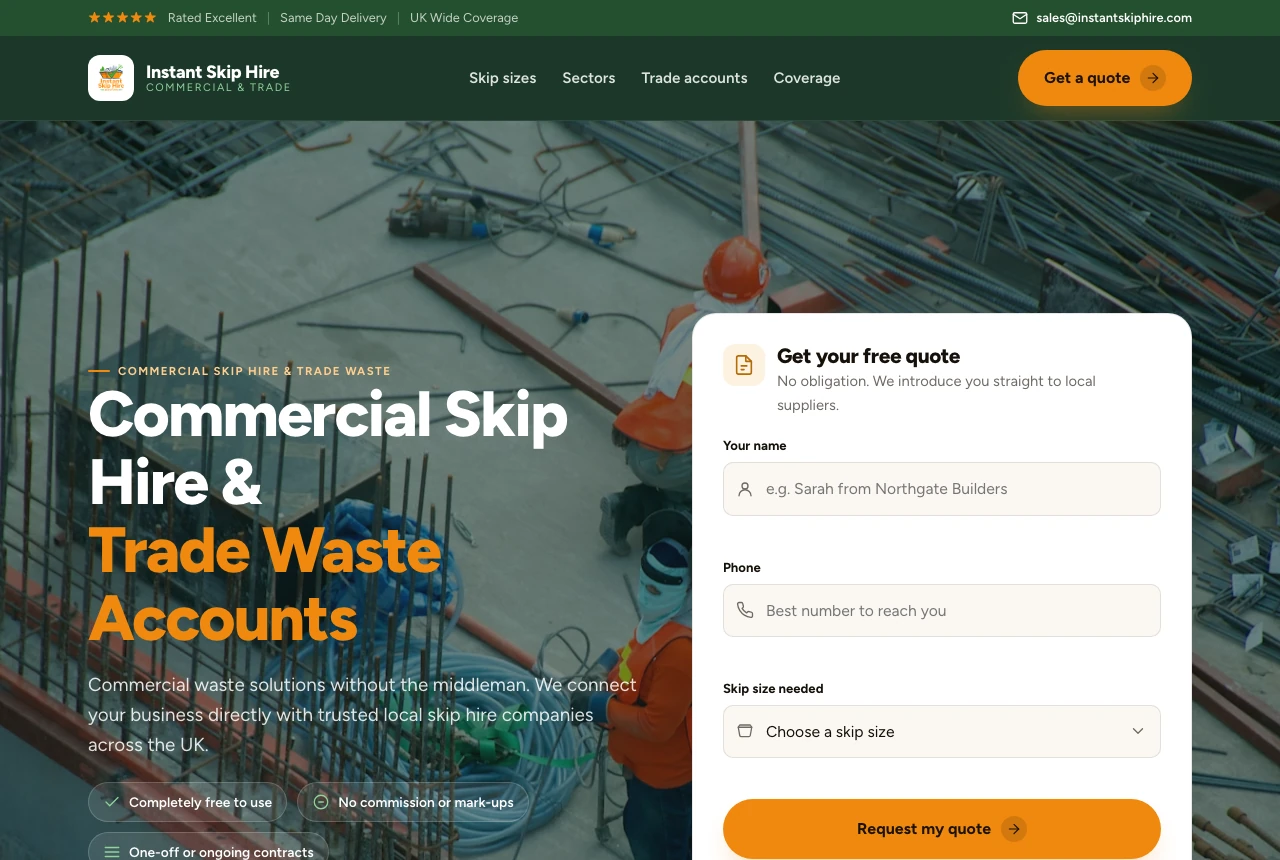
What the engine did, unprompted:
- Read the brand off the page. Primary =
#f0890f(amber), pulled from the logo's pixels, not the green chrome, not the tool's house color. Source confirmed:logo. - Picked a lead-gen-service system and rebuilt the full sequence: nav, a hero on a real construction photo, an above-the-fold quote form, sectors, coverage, social proof, footer.
- Kept the copy real. The verbatim headline (Commercial Skip Hire & Trade Waste Accounts) and the page's actual service lists carried straight through, with no lorem, no invented claims.
And the gates, on the first build:
| Gate | Result | What it means |
|---|---|---|
| Brand fidelity | 100 / 100 | Primary color + logo present; zero house-style drift |
| Imagery | 100 / 100 | Real photography, not a placeholder service |
| Anti-slop lint | 0 high | Passes --threshold high: no gradient hero, no three-up cards, no filler verbs |
The result reads as Instant Skip Hire, leveled up: the same business, sharper. That is the bar: a redesign your customers recognize as yours, not one they have seen on a hundred other sites.
The brand is what makes a redesign hard. The engine extracts it, then refuses to ship without it.
The gate is the product, not the prompt.
Any model can generate a nicer-looking page. What is asymmetric here is the refusal: the brand-fidelity hard floor and the 152-rule linter fail the build when the output drops your brand or reaches for the generic centroid. ux-skill is less "make it pretty" and more "you may not ship slop."
It is not magic. A vague brief still yields a vague system: /ux-discover is a forcing function for a reason. And the AI still writes the markup; the engine sets the rails and checks the result on the way back.
From here
Once the page passes, commit .ux/design-system/MASTER.md alongside it. Every future Claude Code or Cursor session reads that file first, so the next feature you build lands inside the same system instead of drifting back to the average. Re-run /ux-lint in CI to catch regressions. The redesign is not a one-shot. It is a floor your codebase keeps.